Universal Creative managed employee time off through a manual, administrator-dependent process built on paper forms and a Microsoft Access application only administrators could access. What began as a Business Analyst effort to move it to the web became a UX-led redesign, later adopted by NBCUniversal Parks.
Universal Creative managed employee time off through a manual, administrator-dependent process. Employees tracked their own available time, completed and submitted signed absence forms, and contacted departmental administrators when they needed information about their balances or requests. Administrators maintained the official records in a Microsoft Access application that employees could not access directly.
I joined the project as the Business Analyst. The initial direction was to convert the existing Microsoft Access application into a web-based application while supporting new technical and organizational requirements. I documented the existing system, interviewed departmental administrators and HR, and defined business, system, and technical requirements. This included accounting for differences across California, Florida, China, Japan, and Singapore and enabling secure access outside the NBCUniversal network without requiring a VPN.
After the web application was developed, I conducted a heuristic evaluation and identified usability issues that functional requirements alone had not addressed. That evaluation became the turning point that shifted my work from business analysis to UX design. I expanded User Acceptance Testing to evaluate usability, analyzed the findings, and used user flows, competitive research, design principles, and iterative design to improve the employee experience.
The application successfully launched at Universal Creative and was subsequently requested for adoption by NBCUniversal Parks, where I led the implementation.
I combined business analysis with user-centered research and design to transform a manual, administrator-dependent process into an employee self-service experience.
I began by documenting the current workflow, technical constraints, business rules, and regional requirements and translated those findings into system requirements and user stories.
After evaluating the developed application, my work evolved from business analysis to UX design. I used heuristic evaluation, usability testing, competitive analysis, user flows, prototyping, and iterative releases to identify and address gaps between functional requirements and the employee experience.
Universal Creative designs and delivers immersive attractions and experiences for Universal destinations around the world. Its multidisciplinary workforce includes architects, designers, engineers, project managers, financial analysts, legal teams, and other specialized disciplines.
At the time, managing employee time off relied heavily on manual processes and administrative support.
The Microsoft Access application at the center of the process was available only to departmental administrative staff. Employees were responsible for tracking their own available time and had no direct access to the information stored in the system.
When employees wanted to take time off, they completed an absence authorization form, obtained the required signature, and manually submitted it to their department administrator. The administrator then entered the request into the Access application.
If employees wanted to confirm their available balance, review a previous request, or ask a question about their time off, they had to contact their administrator, who retrieved the information on their behalf. View the current-state experience map ↗
The opportunity was therefore larger than converting a Microsoft Access application to the web. We needed to transform an administrator-dependent process into a secure, accessible, employee self-service experience.
Before defining the new system, I needed to understand the operational and technical ecosystem behind it. What initially appeared to be a straightforward time-off application became considerably more complex as I investigated how employee benefits were managed across Universal Creative.
I started by conducting a competitive analysis, benchmarking against other time-off tracking applications to identify functionality gaps and usability opportunities — view the competitive analysis ↗. My research then focused on four interconnected areas: technical requirements, existing workflows and systems, HR requirements, and location-specific policies and regulations.
The application therefore wasn't simply replacing the technology behind the existing workflow. It also needed to support an evolving operating model.
Because the application needed to be accessible outside the NBCUniversal network without requiring a VPN, technical architecture and security were important requirements from the beginning. I worked with development and infrastructure teams to compile requirements for hosting, authentication, security, database, reporting, and external access.
I interviewed departmental administrators who used the Microsoft Access application and documented their workflows, business rules, pain points, and workarounds, along with a functional inventory of what the Access application stored and did.
The new application would change ownership of parts of the process, with HR assuming responsibilities previously handled by departmental administrators. I worked with HR stakeholders to understand their requirements, policies, approval processes, and administrative needs.
Global requirements: Universal Creative's workforce extended across California, Florida, China, Japan, and Singapore. I researched time-off policies and holiday calendars in each location and reviewed the time-off application already used in Florida — the research made it clear that location could not simply be treated as an employee attribute; it affected how the system needed to behave. View the global requirements matrix ↗
The research revealed that the new application couldn't simply replicate the existing Microsoft Access database without accounting for the broader environment around it.
Current workflows, HR's future responsibilities, external-access requirements, and differences across employee locations all introduced requirements that needed to work together within a single application.
My next challenge was turning those findings into a structure the business and development team could work from. I consolidated findings from administrator interviews, HR discussions, technical discovery, existing-system analysis, and regional research into a comprehensive set of requirements, organized around several areas:
Accessing available time, submitting requests, reviewing history, and receiving status information.
Managing employee information, requests, records, and exceptions.
Policies, eligibility, approvals, time-off types, and related business logic.
Differences in holidays, policies, and employment requirements.
Including secure external access without VPN.
Retrieving and analyzing time-off information.
The research also made it clear that there wasn't a single user of the application. These groups interacted with the same underlying information but had different goals, responsibilities, and levels of access.
I translated the requirements into user stories so business and system requirements could be connected to specific user goals, then organized them into a user story map that connected individual requirements to the larger time-off process.
Instead of defining functionality exclusively around what the system needed to support, the stories began framing requirements around what employees, administrators, and HR needed to accomplish.
Needed access to their own information and a straightforward way to manage their time off — view balances, create, cancel, or withdraw requests, and review history.
Review, approve, or reject requests from direct reports, and delegate approval authority to another supervisor when unavailable.
Required broader capabilities to manage requests, employee information, policies, and exceptions than the other two roles.
User story map: As the number of stories grew, I organized them into a user story map connecting individual requirements to the larger time-off process, giving stakeholders and development a shared view of the application. As development progressed, I continued updating the map to reflect planned and completed releases. View the user story map ↗
The initial direction for the project had largely been functional: take the capabilities of the Microsoft Access application and make them available through a web-based system while supporting the new business and technical requirements.
Once the application was developed, I conducted a heuristic evaluation. The evaluation exposed a fundamental gap:
Making the legacy functionality available on the web did not automatically make it usable for employees.
The Access application had been designed for departmental administrators who understood its terminology, workflows, and business rules. The web application introduced an entirely different audience—employees who had never interacted directly with the underlying administrative system. This became the turning point in both the project and my role.
The highest-severity violations:
User Acceptance Testing was intended to confirm that the application met its business and functional requirements. I expanded the evaluation to also examine whether people could successfully understand and use the experience.
I recruited three stakeholders and two employees and asked them to complete a series of representative tasks. Rather than evaluating only whether a task could technically be completed, I observed how participants navigated the application, where they hesitated or became confused, and which interactions required additional explanation. Participants also rated the difficulty of individual tasks.
I made it clear that we were evaluating the application—not their abilities. If an interaction was difficult to understand or a task couldn't be completed, I treated that as a problem with the experience.
Every task passed, but the observations participants left behind surfaced real friction:
I combined the usability findings with issues identified during the heuristic evaluation and looked for recurring patterns. Several opportunities emerged:
Some findings could be addressed before launch. Others were added to the product backlog and prioritized for subsequent releases.
More importantly, the evaluation changed the question I was asking. Instead of only asking:
Does the application meet its requirements?
I began asking:
Can employees understand their information, complete their tasks confidently, and know what happens next?
This was the point where my work moved decisively from business analysis into UX design.
The heuristic evaluation and usability testing revealed a consistent theme: making the legacy functionality available on the web did not automatically create an employee-centered experience.
I translated those findings into principles that guided the next phase of the application.
Organize the experience around what employees need to understand and accomplish rather than reproducing the structure of the administrative system.
Give employees direct access to the information and actions they previously relied on administrators to provide.
Surface balances, requests, and relevant information when employees need it to make decisions.
Make system status visible through confirmations, request status, history, and notifications.
Maintain a consistent experience while allowing policies, holidays, and rules to reflect an employee's location.
Enable employees to securely manage time off outside the corporate network without requiring VPN access.
Using findings from the heuristic evaluation and usability testing, I redesigned key parts of the application around the needs of employees rather than the structure of the legacy administrative system.
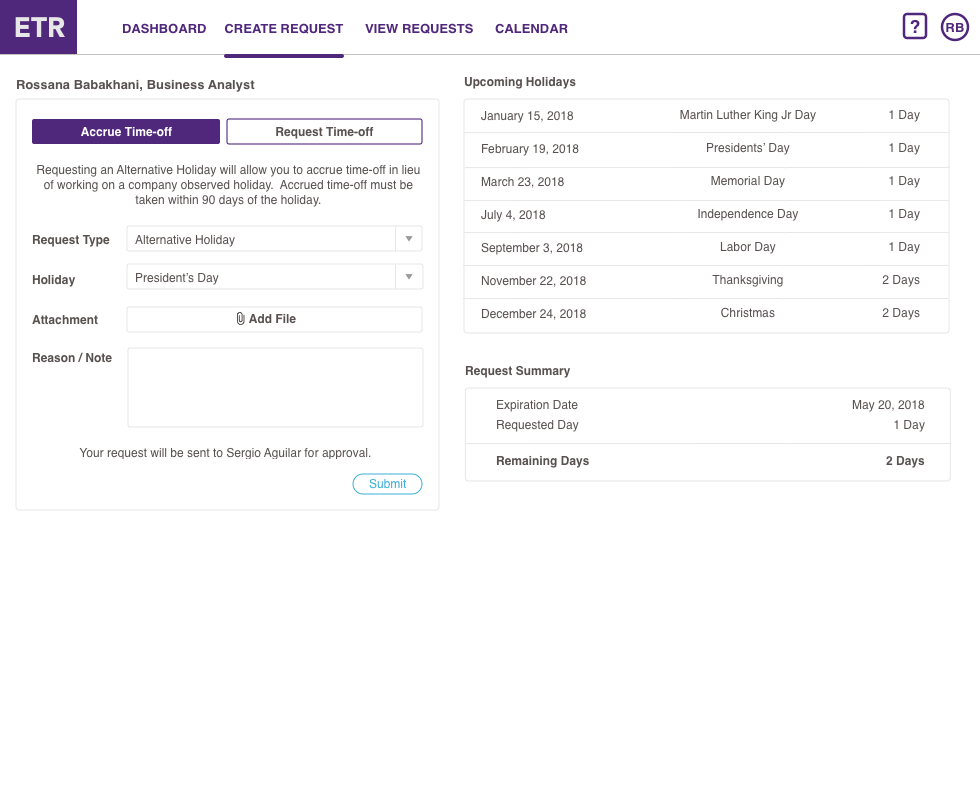
The final prototype focused on making important information visible at the right moment, reducing reliance on administrators, and providing clearer feedback throughout the time-off request process.
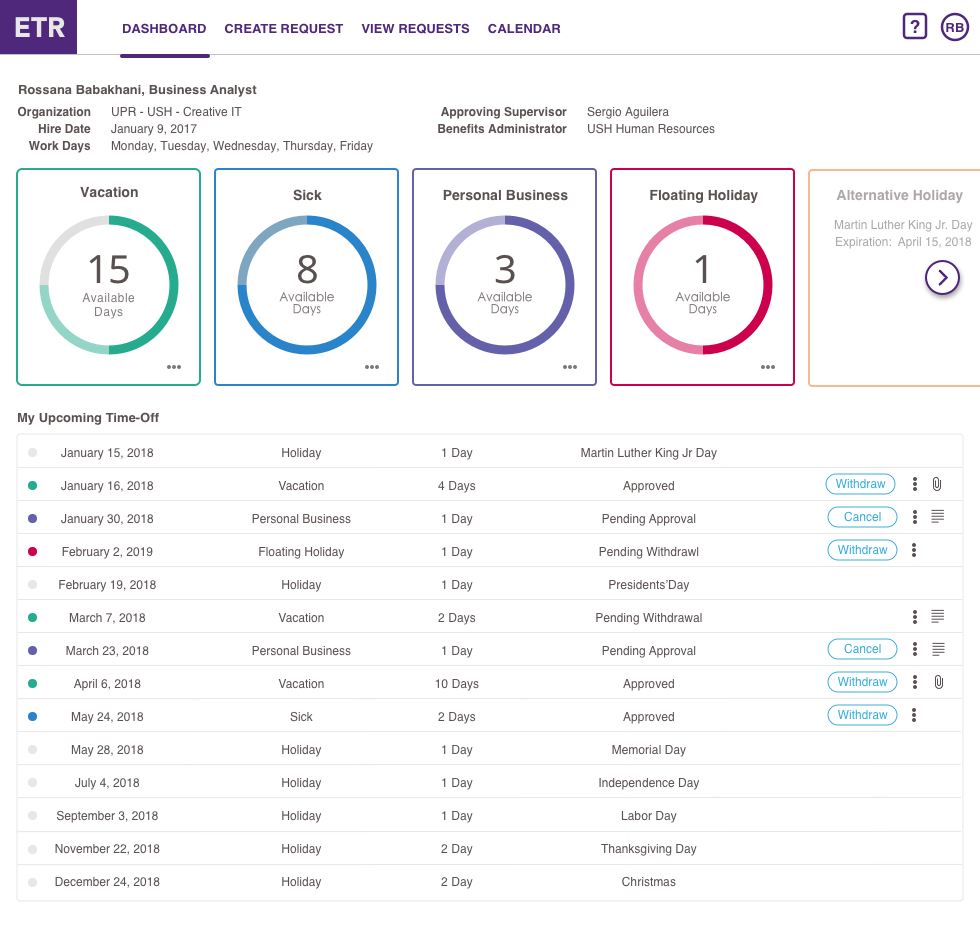
The dashboard brought time-off information and upcoming requests into a single view, giving employees immediate visibility into information that previously required personal tracking or assistance from an administrator.


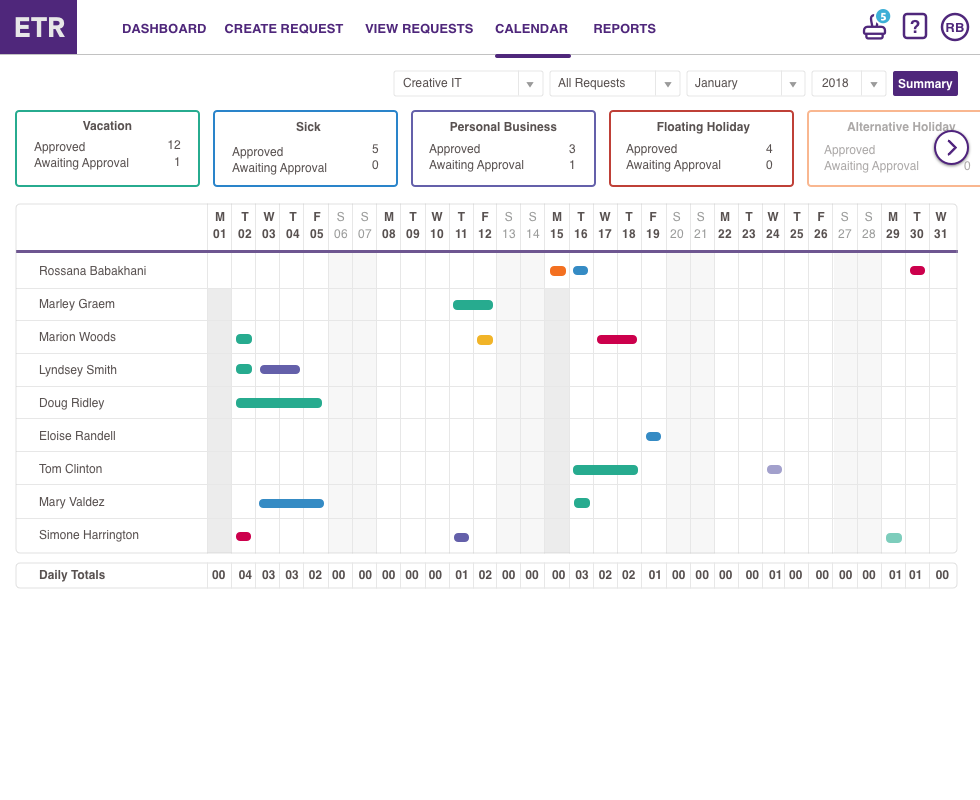
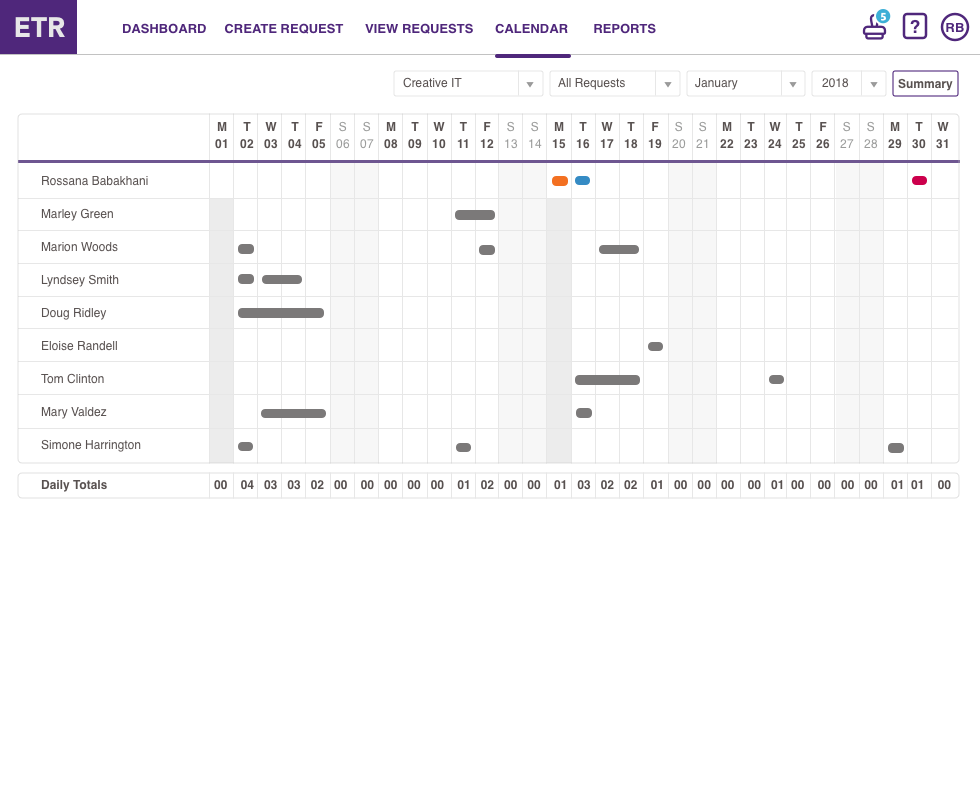
A calendar view gave supervisors and employees a shared, month-at-a-glance look at who was off and when — the supervisor view adds per-benefit summary cards and daily totals, while the employee view keeps team availability visible without exposing benefit-type detail. This addressed the same gap participants raised during UAT: no visibility into who else on the team had already requested time off.


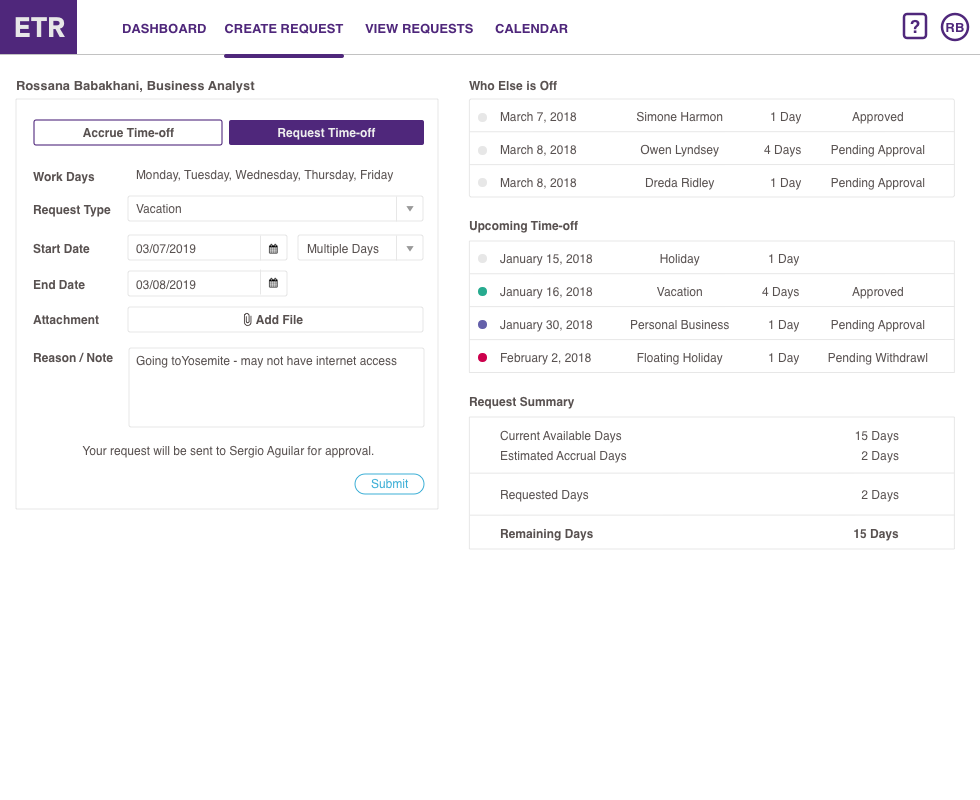
Available time was surfaced within the request experience so employees could understand their remaining benefits while making a decision instead of locating or calculating that information separately.


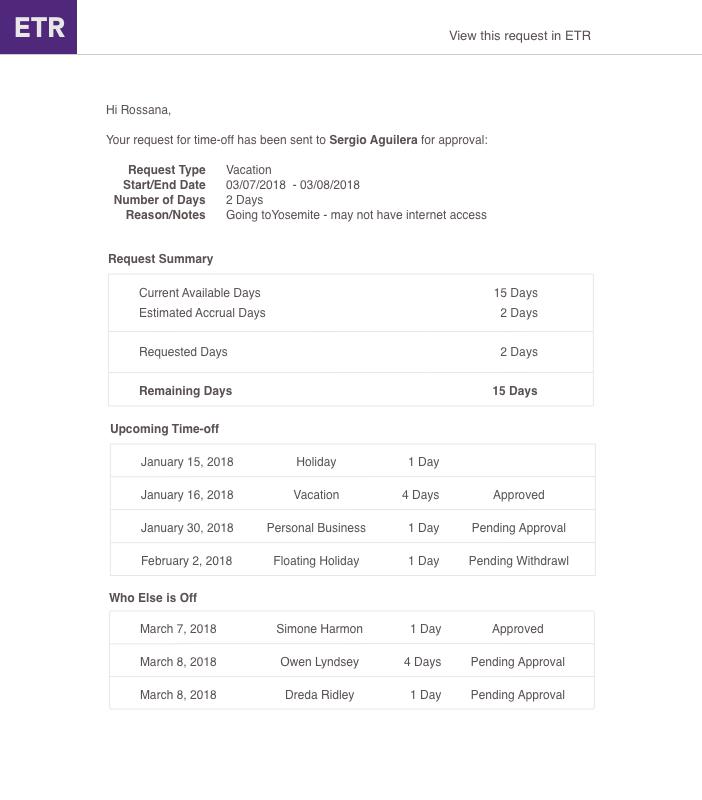
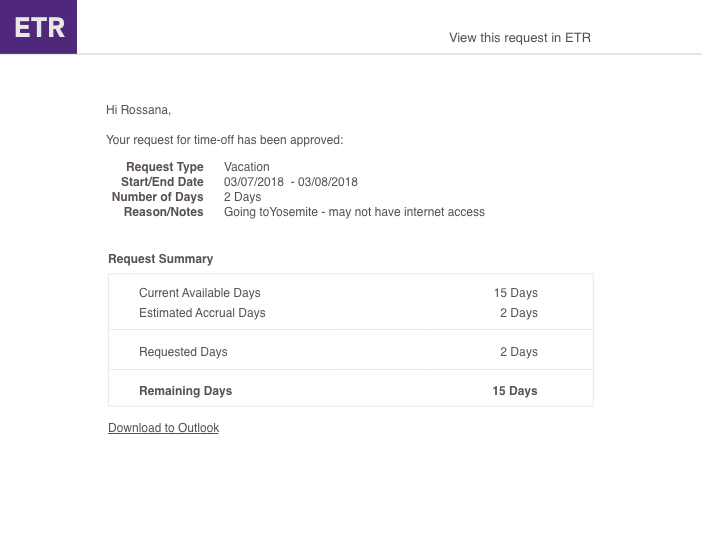
Confirmation screens and email notifications provided feedback when requests were submitted and when their status changed, reducing uncertainty about whether an action had been successfully completed.


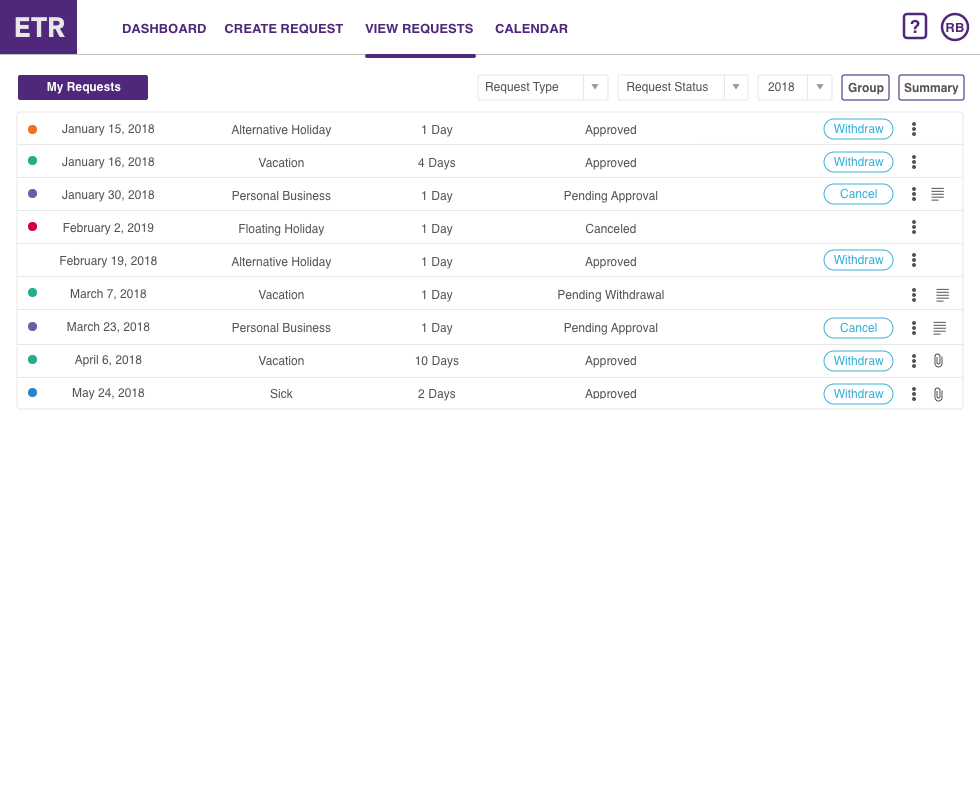
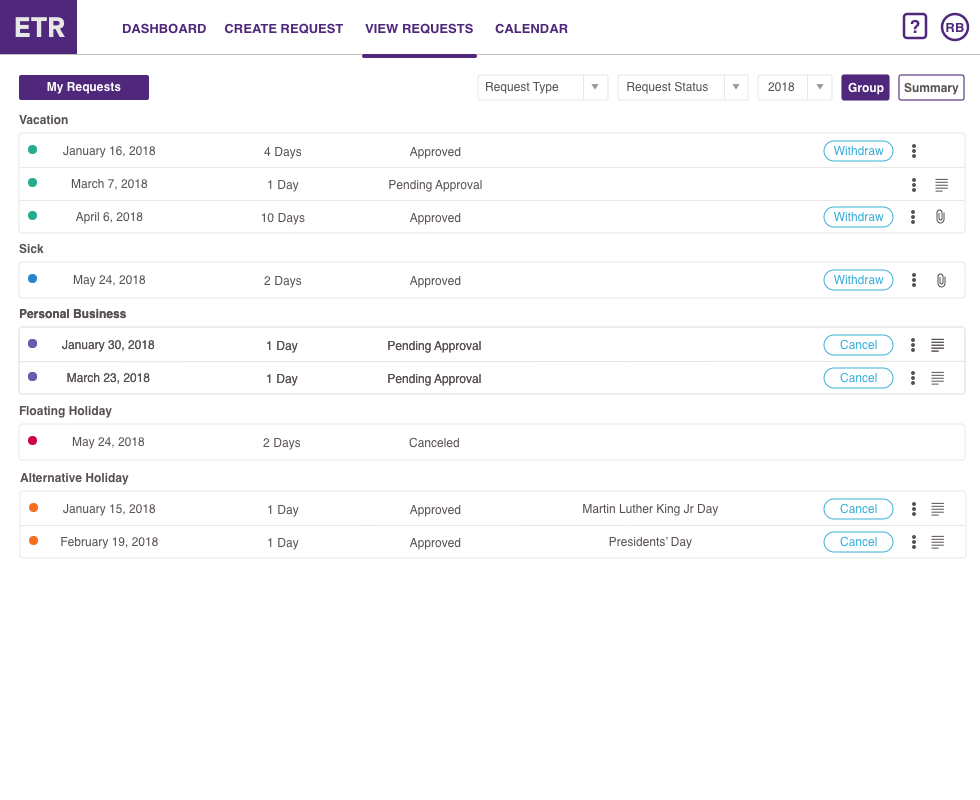
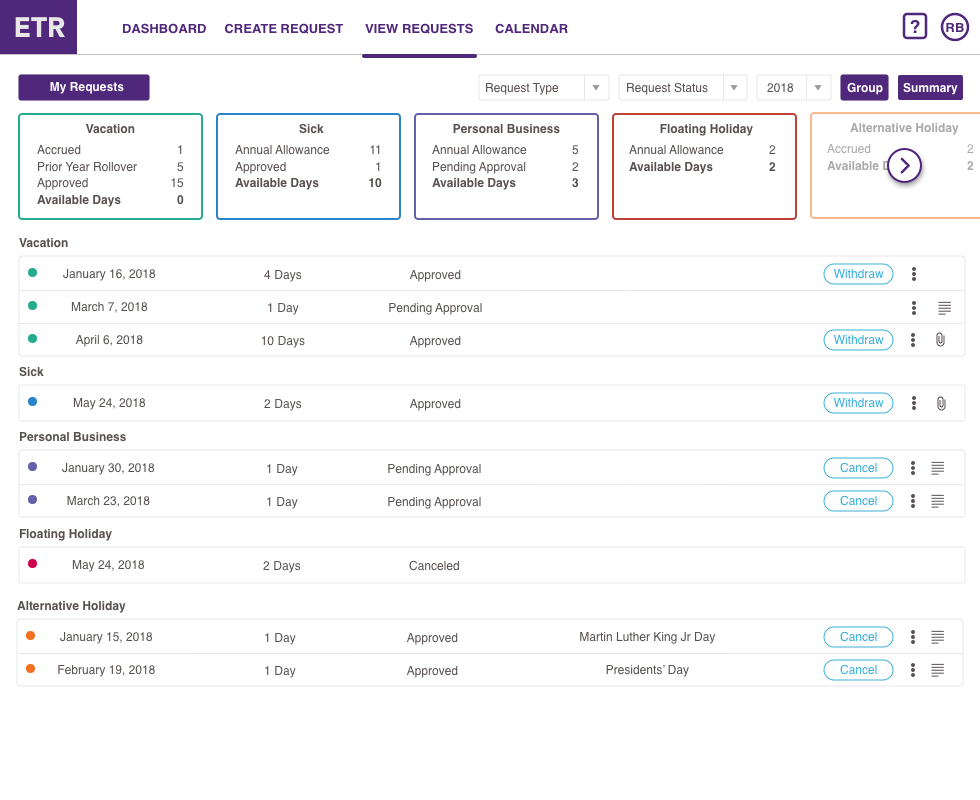
Improved summaries and filtering made it easier for employees to locate and review previous and upcoming requests without administrative assistance.
Clearer page titles, improved information hierarchy, and accessible guidance helped make an administrative process understandable to employees who had never used the legacy application.
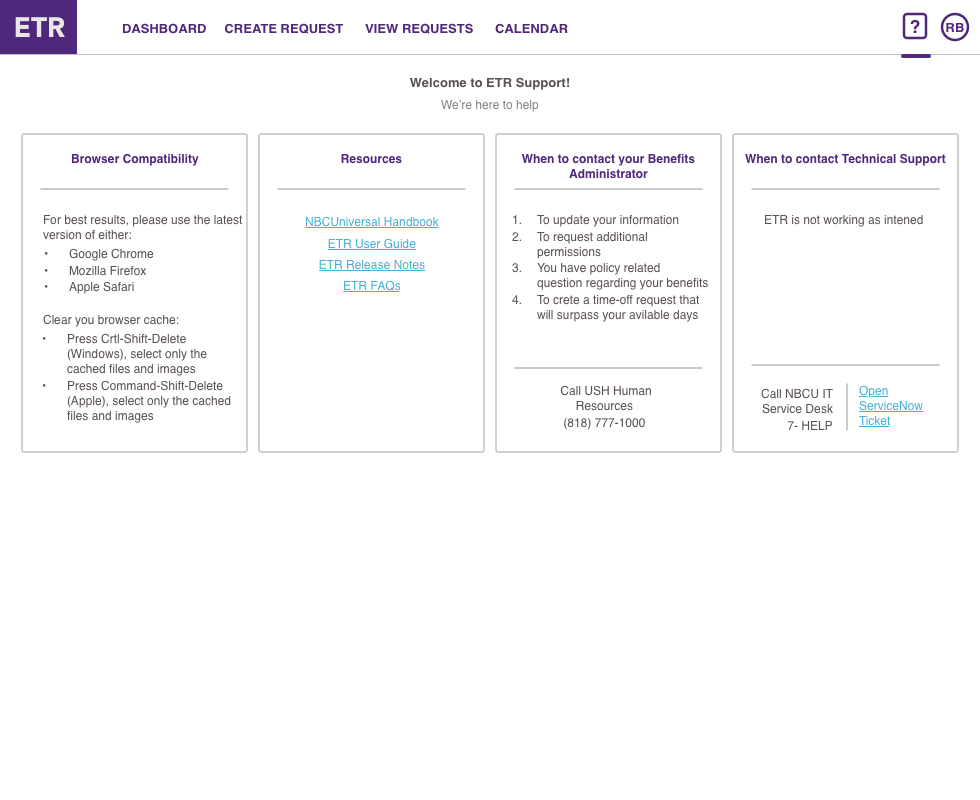
I also created a user guide to support the transition to self-service. The guide provided registration instructions and guidance for common workflows and was made accessible directly from the application.
Together, these changes moved the application beyond a web-based version of an administrative tool toward a self-service experience designed around how employees actually managed their time off.
The Employee Time-Off Request application launched in February 2018, replacing a process built around paper forms, employee-maintained records, and an administrative Microsoft Access application.
Employees gained direct access to their time-off information and could submit and review requests through a secure web application without connecting to the NBCUniversal VPN.
Because the application was accessible outside the corporate network, security was an important component of launch readiness. I coordinated the required application security review, including Veracode application security testing and penetration testing, to support compliance with NBCUniversal's security requirements.
I also supported adoption by developing employee communications, registration instructions, training materials, and the in-application user guide.
Following launch, findings from the heuristic evaluation and usability testing continued to shape the product backlog on a four-week release cycle. Support requests provided another source of user feedback: bugs were addressed as they emerged, while usability issues were evaluated and incorporated into subsequent development cycles — including, that May, the SSO integration that replaced the two-step manual registration employees used at launch, and that June, the ability to approve requests directly from email, the same friction supervisors raised during UAT.
The application proved successful enough that NBCUniversal Parks requested to adopt it for their organization.
I led the implementation for Parks, extending the work beyond the original Universal Creative deployment and helping bring the application to a broader employee population.
What began as an effort to convert a departmental Microsoft Access application into a web-based system had evolved into a solution valuable enough to be adopted elsewhere within the organization.
This project marked an important transition in my career, from business analysis to UX design.
I began by approaching the application through business processes, system requirements, technical constraints, and organizational needs. Those skills were essential for understanding the complexity behind the product—but the heuristic evaluation exposed something the requirements alone couldn't answer:
A system can meet its functional requirements and still be difficult for people to use.
That realization changed how I approached the project.
Usability testing gave me a way to move beyond assumptions and observe how employees actually experienced the application. From there, I began translating what I learned into design principles, interaction decisions, and product improvements.
My background as a Business Analyst remained an important part of my design practice. Understanding systems, business rules, technical constraints, and stakeholder needs allowed me to see the larger ecosystem surrounding the interface. UX added another perspective: ensuring that the people using the system were represented in the decisions shaping it.
The project taught me that successful digital transformation isn't simply about moving an existing process from one technology to another.
It's an opportunity to reconsider the experience altogether.