Rossana Babakhani ← Back to work
Case Study

Clinical Microbiology Setup & Workup

Building new Clinical Microbiology functionality into CLS: one traceable, task-based workflow for a fragmented, multi-day laboratory process—from specimen setup through organism workup and resulting.

RoleUX Researcher & Workflow Designer
PlatformClinisys Laboratory Management System
Timeline8 months
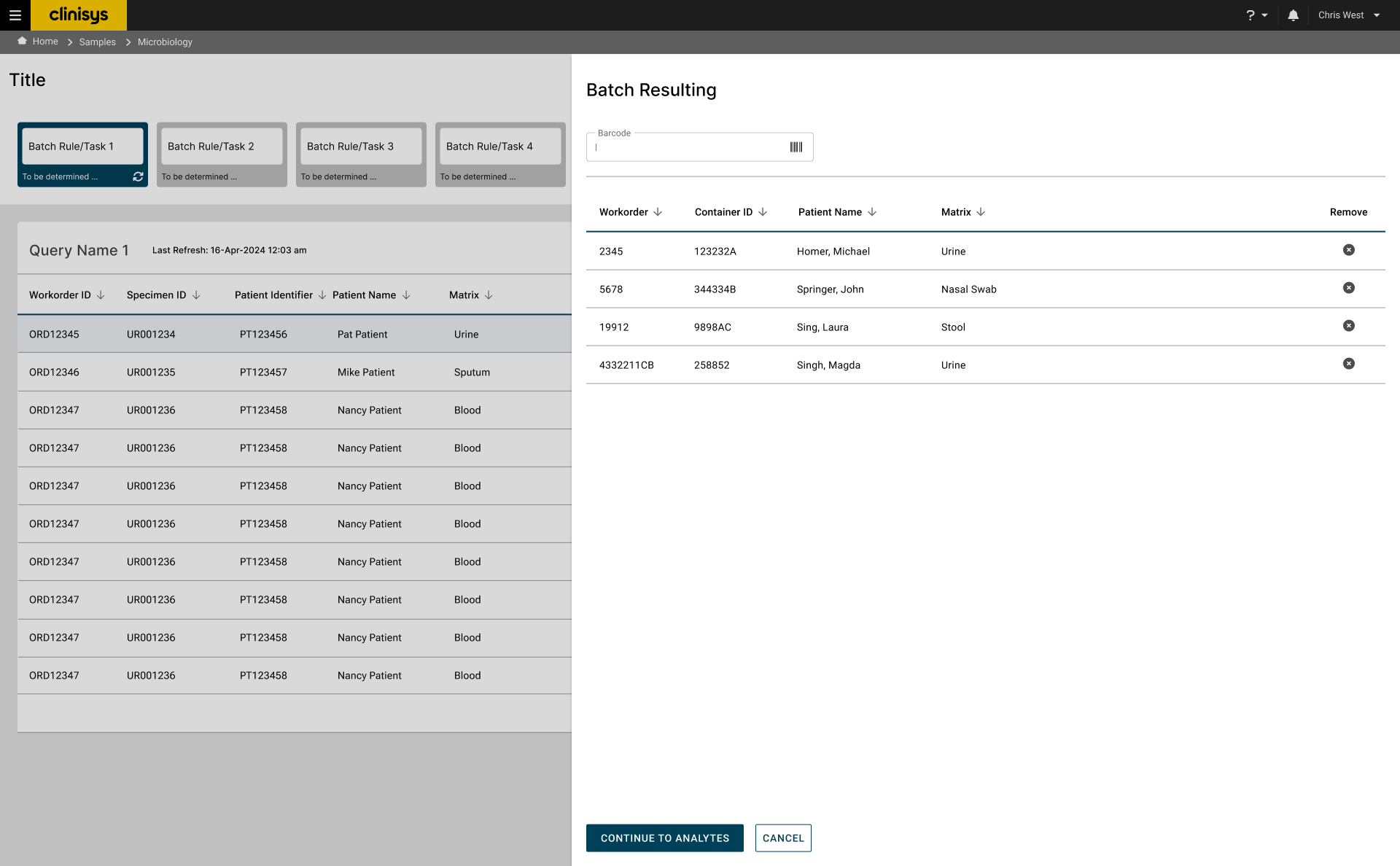
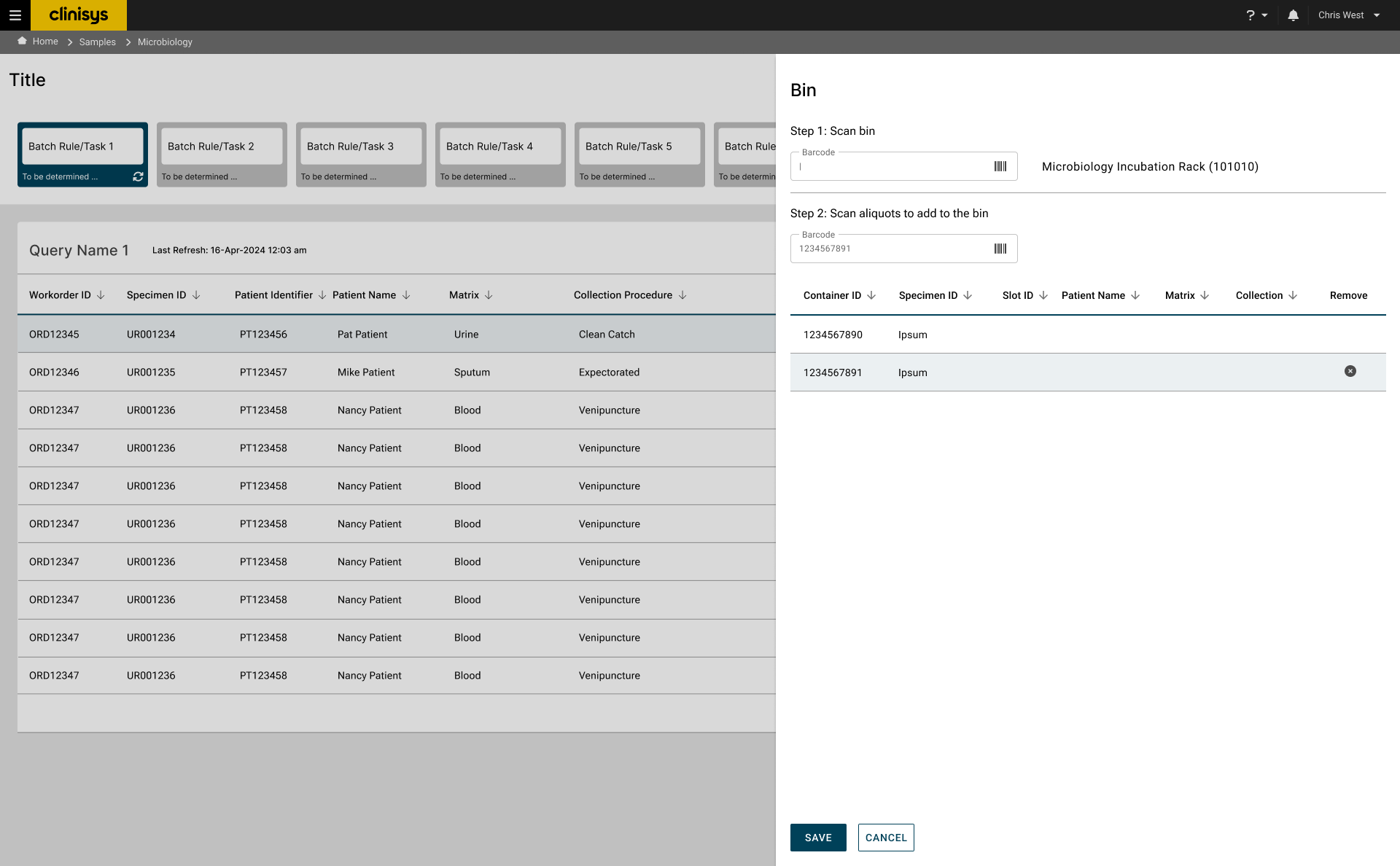
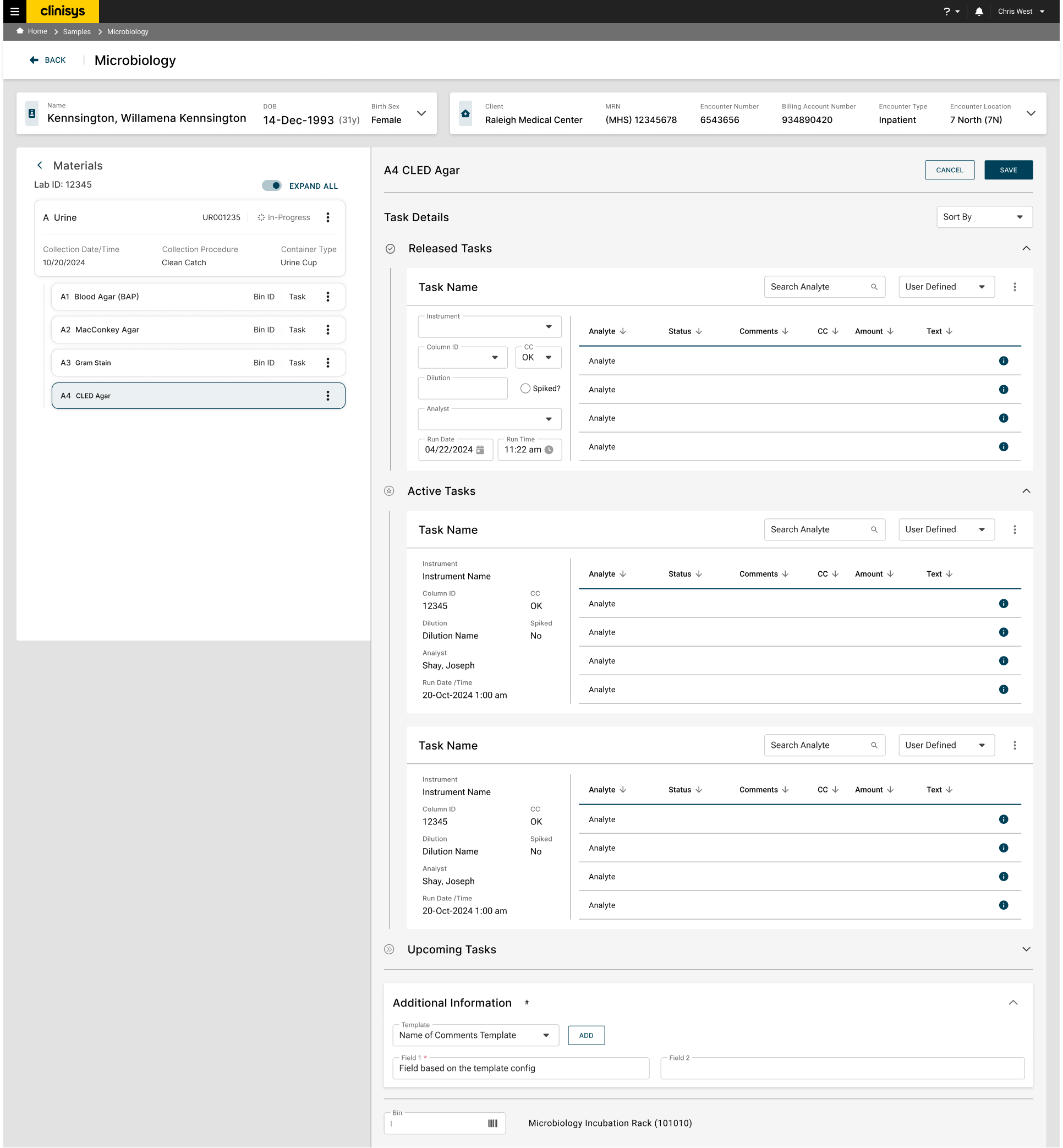
Clinisys Processing screen showing batch tiles and the Incubation worklist, with the Select Test modal and Instrument Result Import Confirmation panel (Susceptibility results) shown as floating detail cards

Clinisys was expanding CLS — a task-based Laboratory Management System originally designed for Environmental laboratories — to support healthcare, beginning with Clinical Microbiology. The existing experience fragmented setup, incubation, organism workup, and resulting across multiple screens, forcing laboratory staff to track follow-up work manually and repeatedly reconstruct specimen context.

As UX Researcher and Workflow Designer, I attended an ongoing Client Advisory Group of five client laboratory organizations, conducted three current-state workflow interviews to build a service blueprint, and translated the findings into a cyclical workflow model and information architecture. I then designed and evaluated the proposed workflow through two rounds of moderated usability testing with five Clinical Microbiology professionals in each round.

The resulting design connected specimens, media, organisms, and tasks within one continuous workflow and used condition-driven tasks to surface follow-up work. The solution was developed and shipped. A comparative interaction-cost analysis found that entering and updating an organism workup took 8 clicks on 1 screen today, versus 13 clicks across 3 screens and 2 modals to launch and complete a worksheet in the new workflow — concentrated entirely in a new step with no equivalent in the current system. The organization accepted this trade-off in exchange for stronger traceability, workflow visibility, and support for both Clinical and Environmental laboratories.


My roleUX Researcher & Workflow Designer
ResearchClient Advisory Group (5 labs) · Three workflow interviews · Two usability rounds with five participants each
Key contributionTranslated a cyclical, multi-day laboratory process into a task-based workflow and scalable information architecture
OutcomeDeveloped and shipped; client response became more positive over successive demonstrations
Key trade-offGreater workflow visibility and traceability at the cost of additional screens, modals, and data entry

Contributions

  • Attended an ongoing Client Advisory Group of five client laboratory organizations
  • Built custom Copilot prompts and agents, tailored to the group's specific meeting structure, to synthesize transcripts and recaps into structured summaries
  • Conducted three current-state workflow interviews
  • Created the service blueprint, cyclical workflow model, and information architecture
  • Translated research findings into workflow principles and interface requirements
  • Conducted two rounds of moderated usability testing
  • Analyzed interaction cost across the current and proposed workflows
  • Iterated the design with product, domain, and client stakeholders

Method

I combined qualitative research, workflow modeling, information architecture, concept evaluation, and interaction-cost analysis. The work progressed from understanding the current state to defining a system model, testing that model first as wireframes and then as an interactive prototype, and measuring the trade-offs raised during validation.

Clinisys was extending a laboratory platform originally designed for Environmental workflows to support Clinical Microbiology. That created a structural mismatch: the platform assumed predictable, task-based progression, while microbiology work repeatedly cycles through incubation, observation, organism workup, and follow-up testing over several days.

The Clinical Microbiology Setup & Workup functionality covered here is newly built, not a redesign of an existing screen — no dedicated Clinical Microbiology workflow existed in CLS before it. Clinical work was instead run through the same task-based screens built for Environmental laboratories, so setup, task execution, and resulting were distributed across multiple generic screens. Laboratory staff relied on memory, physical organization, and manual tracking to determine what required attention next. The challenge was to build a patient-centric, cyclical workflow on top of the platform's existing task-based architecture—without compromising traceability in a high-volume, regulated environment.

Challenges

  • Setup, task execution, and resulting were fragmented across multiple screens.
  • Follow-up work lacked visibility.
  • Organism-level work was difficult to trace.
  • Existing workflows did not adequately support microbiology's cyclical nature.

Constraints

  • Existing CLS platform architecture
  • Established task-based LMS framework
  • Support for both Clinical and Environmental laboratories
  • Traceability and audit requirements
Client Advisory Group
View the summary ↗ Read the full report ↗
ParticipantsClient Advisory Group (5 client laboratories)
FormatOngoing sessions throughout the project
MethodAdvisory group synthesis

Understanding how the workflow actually happens

The Product team established an ongoing Client Advisory Group of five client laboratory organizations, meeting regularly throughout the project, with representatives spanning technicians, supervisors, lab managers, administrators, and pathologists. I attended the sessions, documented observations, and synthesized the recurring patterns across organizations into the themes below — using custom Copilot prompts and agents built around the group's specific meeting structure, rather than generic AI summaries, to help process the volume of transcripts and recaps.

Key discovery

The central challenge wasn't limited to individual screens or isolated usability problems — the underlying system architecture didn't reflect how Microbiology work actually progressed over time.

Cyclical progression

Results determine the next action, so microbiology cannot be represented as a fixed sequence. The system needed to generate and resurface work throughout repeated incubation and observation cycles.

"I have to come back to this later — there's nothing in the system that tells me when."Clinical Microbiology Lab Technologist

Fragmented visibility

Staff moved between screens and used manual tracking to remember pending work. The new workflow needed to show active, completed, and upcoming work in one place.

"I'm going back and forth between screens just to finish one observation."Clinical Microbiology Lab Technician

Context and traceability

Organism work could not be separated from its originating specimen and media. These relationships needed to remain visible throughout workup and resulting.

"Entering the data is easy — it's finding it again that's the problem."Sr. Clinical Microbiology Lab Scientist

Service Blueprint
View the blueprint ↗ Read the full report ↗
Sessions3 microbiology labs
Duration60 min
Method1:1 interviews

A gap between assumed and actual workflow

The Client Advisory Group revealed a gap between the workflow the product team assumed and the process laboratories actually followed. To investigate it, I conducted three 60-minute interviews with microbiology laboratories and mapped the current state across roles, system interactions, and backstage dependencies.

The blueprint showed that workflow continuity depended heavily on memory and physical organization. Important information moved between roles and screens without a reliable system-level representation of what was pending. This established workflow visibility—not data entry—as the central design problem.

Key discovery

Internal subject-matter experts brought valuable microbiology experience, but some assumptions reflected earlier laboratory practices. Client laboratories had since developed local workarounds that were not represented in the platform. Direct research helped the team distinguish historical expectations from current operational behavior.

Workflow Model
View the model ↗ Read the full report ↗

One connected system, not two documents

Research established that the solution needed two connected structures: a cyclical workflow model describing how work progresses, and an information architecture preserving the relationships among specimens, media, tasks, organisms, and workup activities.

Tasks became the system's primary unit of work. Condition codes generated subsequent tasks based on observations and results, allowing work to move through repeated incubation and follow-up cycles, until a final report is ready for release.

1 · Setup

A received specimen initiates the workflow. The user checks in the specimen, the system generates the required plates, and the user places them in incubation.

2 · Incubation

The system is configured with the number and frequency of reads, performs scheduled reads, and notifies the user when one is due. Incubation and reads repeat until results are released.

3 · Tasks

The system guides the user through organism identification, workup, plate reading, and condition-code entry, assigning the next task automatically after each cycle.

4 · Results

The system compiles all data, results, and interpretations. Results can be reviewed by authorized users before being approved, released, and made available as a final report.

Information Architecture
View the model ↗ Read the full report ↗

Structure that travels with the work

The information architecture keeps every task connected to its specimen, media, and organism context: an order produces a specimen, a specimen produces culture media, and media task orchestration governs observation, workup, review, and results — with additional media created from an organism looping back into the same structure.

Together, the workflow model and this architecture let Clinical Microbiology operate within the existing task-based platform without forcing the work into a linear sequence.

Task orchestration rules

Only one task can be active for a media at any given time. Completed tasks move to Released and remain in task history. Tasks inform users what needs to be performed and when — follow-up tasks may be timed at 24, 48, or 72 hours — and results cannot be reviewed or released until all required workup tasks are released.

Each principle below traces back to a specific finding from research — what participants described, what the service blueprint exposed, or what the workflow model demanded — translated into a concrete decision in the new experience.

1. Preserve context across the workflow

Keep specimen, media, organism, and task information together so users can move between activities without reconstructing context.

2. Let the system track what comes next

Generate time- and condition-driven follow-up tasks so pending work no longer depends on memory or physical tracking.

3. Support repetition without breaking continuity

Allow plating, incubation, observations, organism workup, and resulting to repeat while remaining part of one traceable workflow.

Usability Testing
View the wireframes ↗ Read the full report ↗
Participants5 client reps
FormatOne-on-one, remote
Duration60 min each
MethodModerated usability testing

Where the design held up, and where it didn't

I tested low-fidelity wireframes with five Clinical Microbiology professionals in individual, 60-minute remote sessions. Because the designs were not yet interactive, the sessions evaluated workflow structure, information architecture, and terminology rather than task-completion performance.

Testing supported the overall direction but exposed five issues that needed to be addressed before prototype validation.

Method note

Because this round tested low-fidelity wireframes rather than a working prototype, sessions focused on validating workflow concepts, information architecture, and terminology rather than polished interface interactions. That shifted the format toward participants describing how they'd want the workflow to work, rather than completing scripted tasks start to finish. The findings below reflect that: directional, concept-level feedback that shaped the interactive prototype evaluated in the next round.

Terminology Confusion

Finding: "Backlog," "aliquot," and "matrix" were unfamiliar or ambiguous.

Decision: Replace them with microbiology-specific language such as "pending list," "order ID," and "plates," or support configurable terminology.

Role-Specific Workflows

Finding: Receiving and setup tasks are distinct and handled by different roles with minimal overlap.

Decision: Tailor workflows to align with the distinct tasks handled by receiving, setup, and result-entry roles.

Missing Workflows

Finding: Setup time tracking, no-growth reporting, and mixed flora result handling were missing from the design.

Decision: Add functionality for setup time tracking, no-growth reporting, and mixed flora result handling.

Plate Management

Finding: Participants preferred preconfigured plates over manually adding or deleting them, but wanted permissions where that flexibility exists.

Decision: Develop permissions to control adding or deleting plates and direct exams, keeping preconfigured workflows the default.

Data Presentation

Finding: The material tree differed radically from participants' existing systems, and order comments, special requests, modifiers, and pending work outside the current encounter were not visible on the main screen.

Decision: Incorporate the Clinisys Design System for visual consistency, and surface comments, requests, modifiers, and a unified pending-work view directly on the main screen.
Usability Testing
View the prototype ↗ Read the full report ↗
Participants5 client reps
FormatOne-on-one, remote
Duration60 min each
MethodModerated usability testing

What changed between rounds — and what didn't

The second round evaluated an interactive prototype with five Clinical Microbiology professionals using representative scenarios from backlog prioritization through resulting.

The underlying workflow model continued to perform well. Participants valued personalized worklists and improved access to specimen context, and the unfamiliar material hierarchy became understandable with use. However, visual refinement had not reduced the number of steps as much as participants expected. The primary concern therefore shifted from structural usability to interaction efficiency.

The system-level view

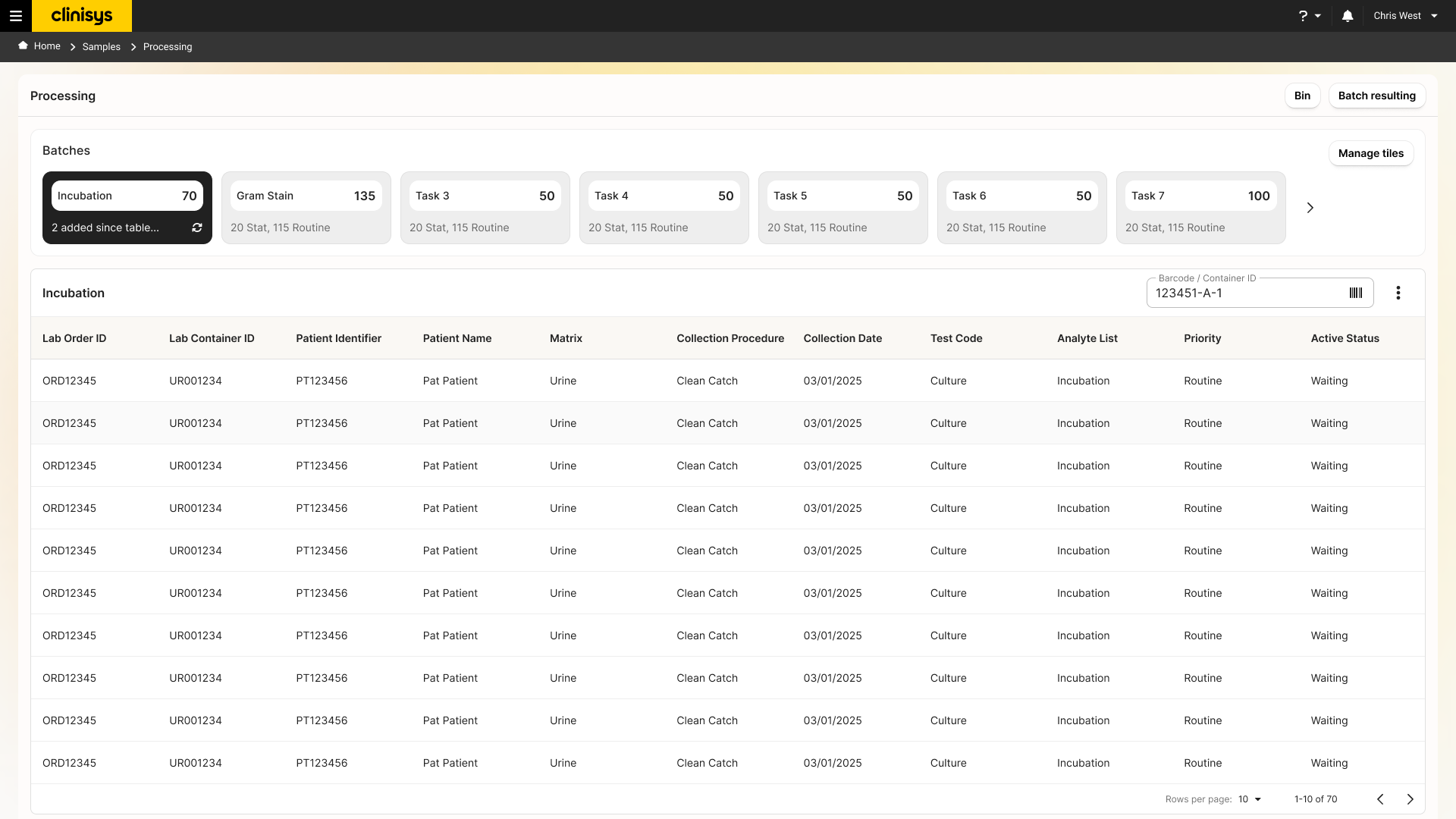
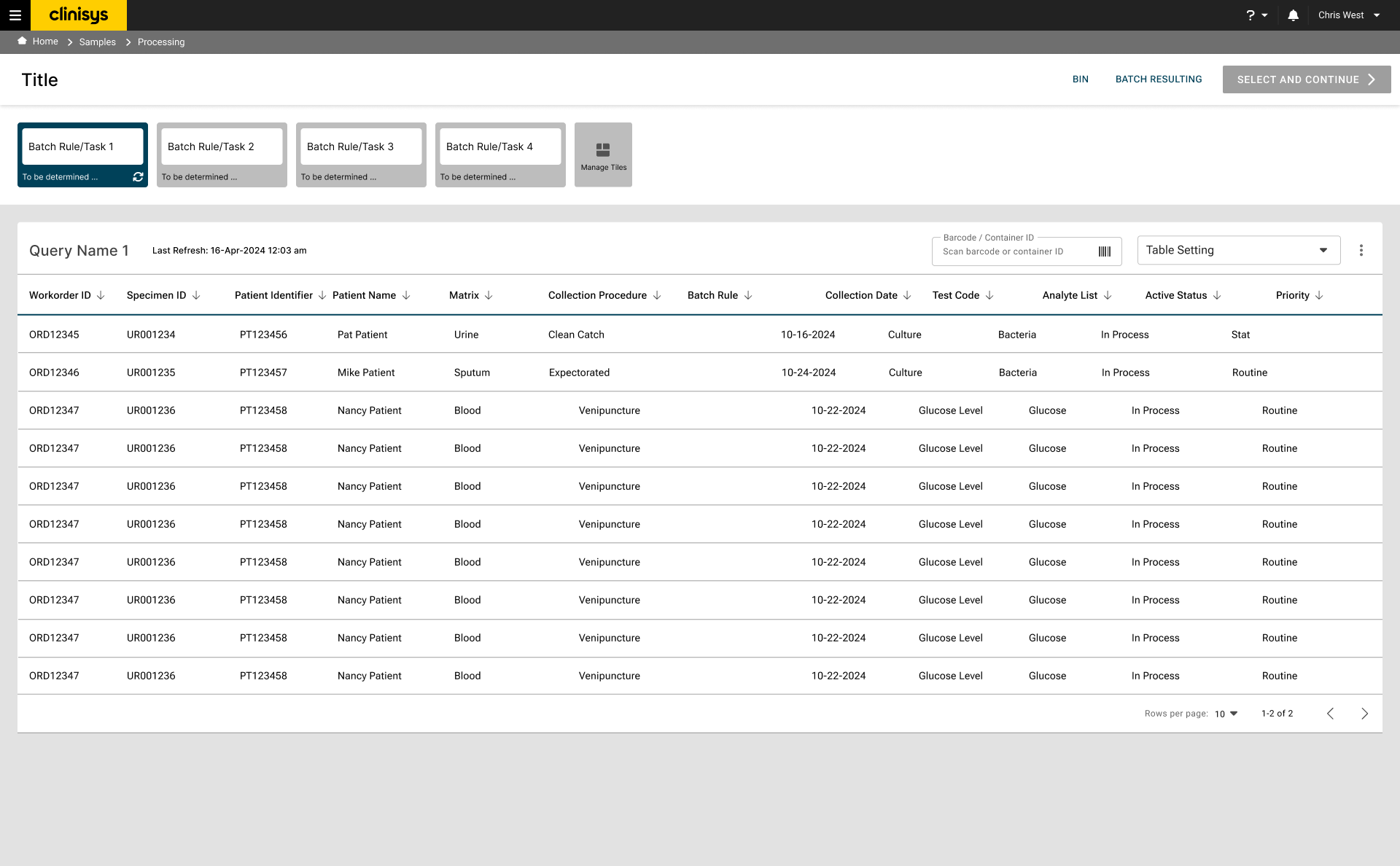
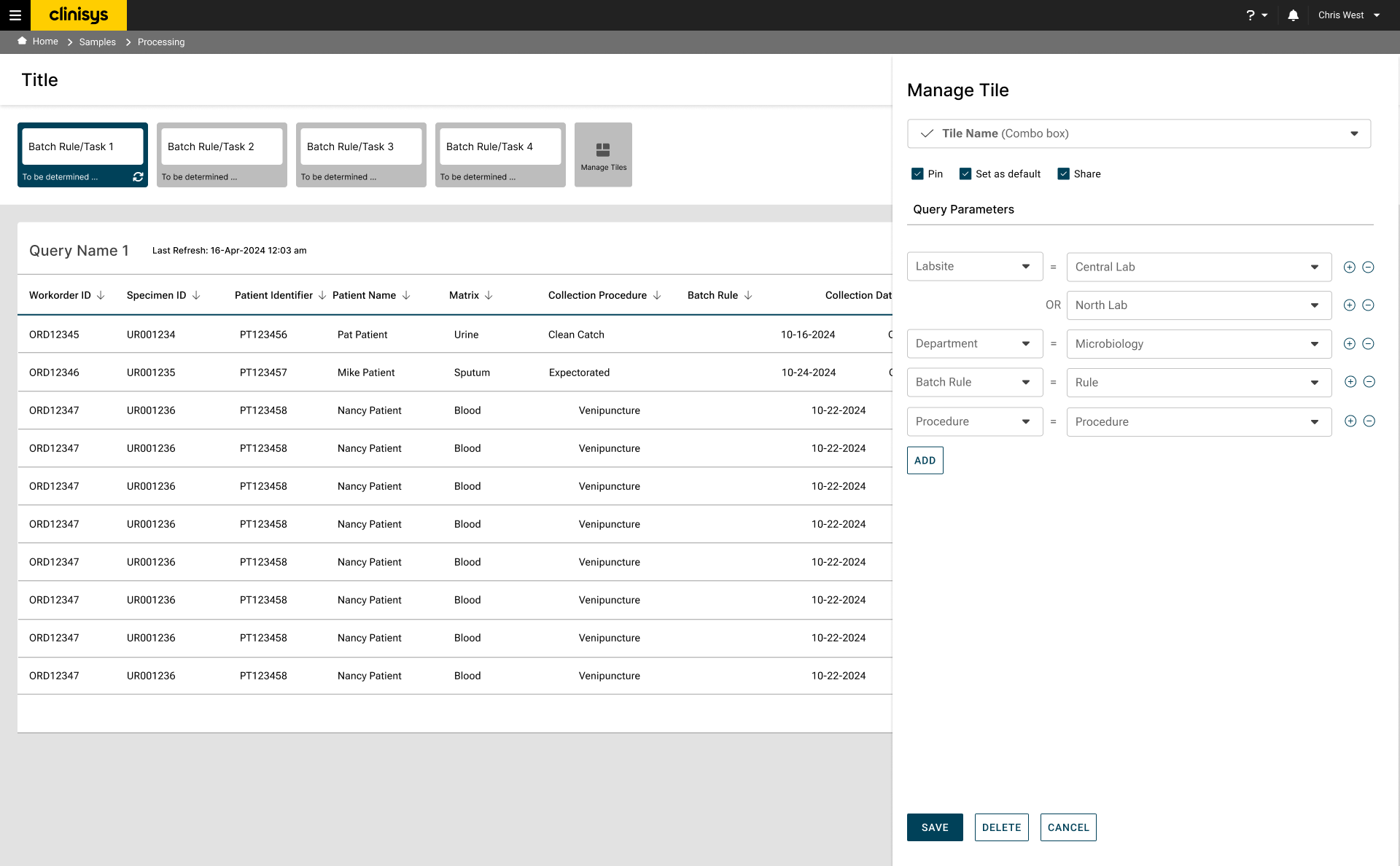
Processing screen showing batch tiles for Incubation, Gram Stain, and other tasks, with a table of samples waiting in the Incubation batch

Batches group work by task type and surface counts and priority mix at a glance — the interface behind Task-Based Workflow and Increased Contextual Information. Click to enlarge.

The drill-in view

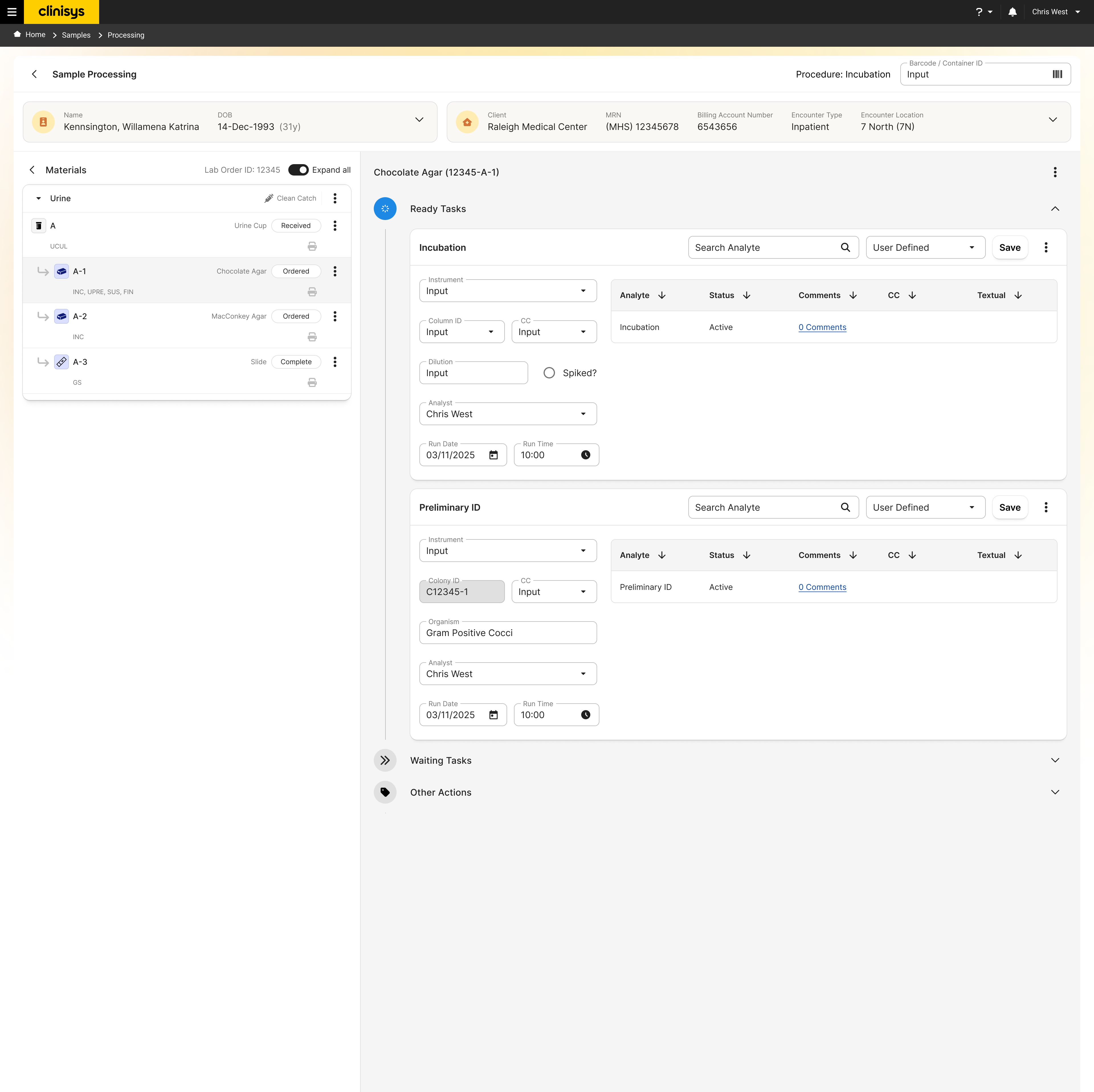
Sample processing screen showing the materials tree for a urine specimen and Ready Tasks for Incubation and Preliminary ID

Opening a batch item keeps specimen, media, and organism context together while tasks like Incubation and Preliminary ID run in place — the interface behind Material-Based Navigation and Personalized Worklists. Click to enlarge.

Validated: Task-Based Workflow & Personalized Worklists

The task-based model supported representative Clinical Microbiology activities end to end, and participants consistently valued organizing and prioritizing their own work from the backlog rather than working strictly in system-assigned order.

Improved with use: Material-Based Navigation

Unfamiliar at first, the material hierarchy became intuitive once participants worked through representative scenarios — confirming it needed onboarding, not a different design.

Still unresolved: Interaction Cost

Visual refinement had not reduced the number of steps as much as participants expected, shifting the primary concern from structural usability to interaction efficiency going into the next round.

Interaction Cost Analysis Read the full report ↗
TriggerClient concern from prototype validation
MethodComparative workflow walkthrough
ComparisonCurrent state vs. proposed workflow
MetricsClicks, screens, modals, scrolls, data fields

Testing the interaction-cost concern objectively

Participants felt that the new workflow required more effort than the current system. I tested that concern by mapping representative workflows across both experiences and comparing clicks, screens, modals, scrolls, and data fields.

Search (either workflow)2 clicks · 1 screen
Enter/update organism & workup — today8 clicks · 1 screen · 5 data fields
Launch & complete a worksheet — new workflow13 clicks · 3 screens · 2 modals · 13 data fields

Search itself didn't change. The cost sat entirely in organism and workup entry: today's workflow reaches a save in 8 clicks with no modals, while launching, running, and saving a worksheet in the new workflow takes 13 clicks across 3 screens and 2 modal dialogs — a step that has no equivalent in the current system at all. A separate path for importing a completed worksheet added at least 4 more clicks before reaching that same review step.

Key discovery

The map showed the same finding twice: two current-state paths through "enter organism & workup" — one starting clean, one starting by deleting an existing test code first — both converged on the same 8 clicks, 1 screen, 5 data fields. The new workflow's added cost wasn't scattered friction across the whole experience; it was concentrated in one new step doing new work — launching and importing a worksheet — that supported task orchestration, incubation management, and specimen progression the current system didn't provide.

Count alone isn't quality

Reducing clicks didn't necessarily produce a better workflow. Additional interactions were introduced deliberately where they improved continuity, traceability, and understanding.

Added steps, added guidance

New screens, dialogs, and data entry supported task generation, incubation management, specimen progression, and workflow visibility — shifting responsibility from user memory to the system.

Evaluate the whole process

Some individual activities needed more interactions, but the overall workflow reduced cognitive effort by coordinating follow-up work and preserving context across multiple days of lab activity.

Where the added cost actually sits

The current-state and proposed-workflow maps aren't matched turn for turn — the proposed workflow restructures the task itself (launching and importing a worksheet, for instance, has no equivalent step in the current system) — so cost is compared at the workflow level, not as a simple step count.

Inline the Worksheet Modals

Investigate whether the worksheet modals can become inline interactions instead of blocking dialogs.

Reduce Effort, Not Context

Preserve the additional context the new workflow surfaces while reducing the effort required to scan and enter it.

The new workflow was developed and shipped. Because it differed substantially from the previous system, clients initially needed time to understand the task-based model and material hierarchy. Reception became more positive over successive monthly demonstrations, with clients increasingly asking when the workflow would become available to their laboratories.

DeliveryDeveloped & shipped
Adjustment periodLearning curve, offset by time
Trade-offAdditional screens & data entry for full visibility
Client receptionGrew warmer over successive demos

The final design did not minimize every interaction. Instead, it made a deliberate product trade-off: additional screens and data entry in exchange for a more complete view of specimen, organism, task, and workflow state. The interaction-cost analysis made that trade-off visible and identified specific opportunities for future optimization.

This project demonstrated that complex workflows cannot be improved by simplifying the interface alone; the underlying system model must reflect how the work actually progresses. Direct research revealed a cyclical process that the existing platform and internal assumptions did not fully represent.

The most important contribution was not a single screen. It was a shared workflow model that connected qualitative evidence, system architecture, interface decisions, and validation. When participants later questioned the design's efficiency, interaction-cost analysis allowed the team to examine the concern objectively and make an explicit trade-off rather than defending the design on intuition.