Clinical Microbiology Workflow Redesign
Combined observational research, workflow analysis, service blueprinting, information architecture, and usability testing to understand how microbiologists perform setup, incubation, organism workup, and resulting within a task-based Laboratory Management System (LMS).
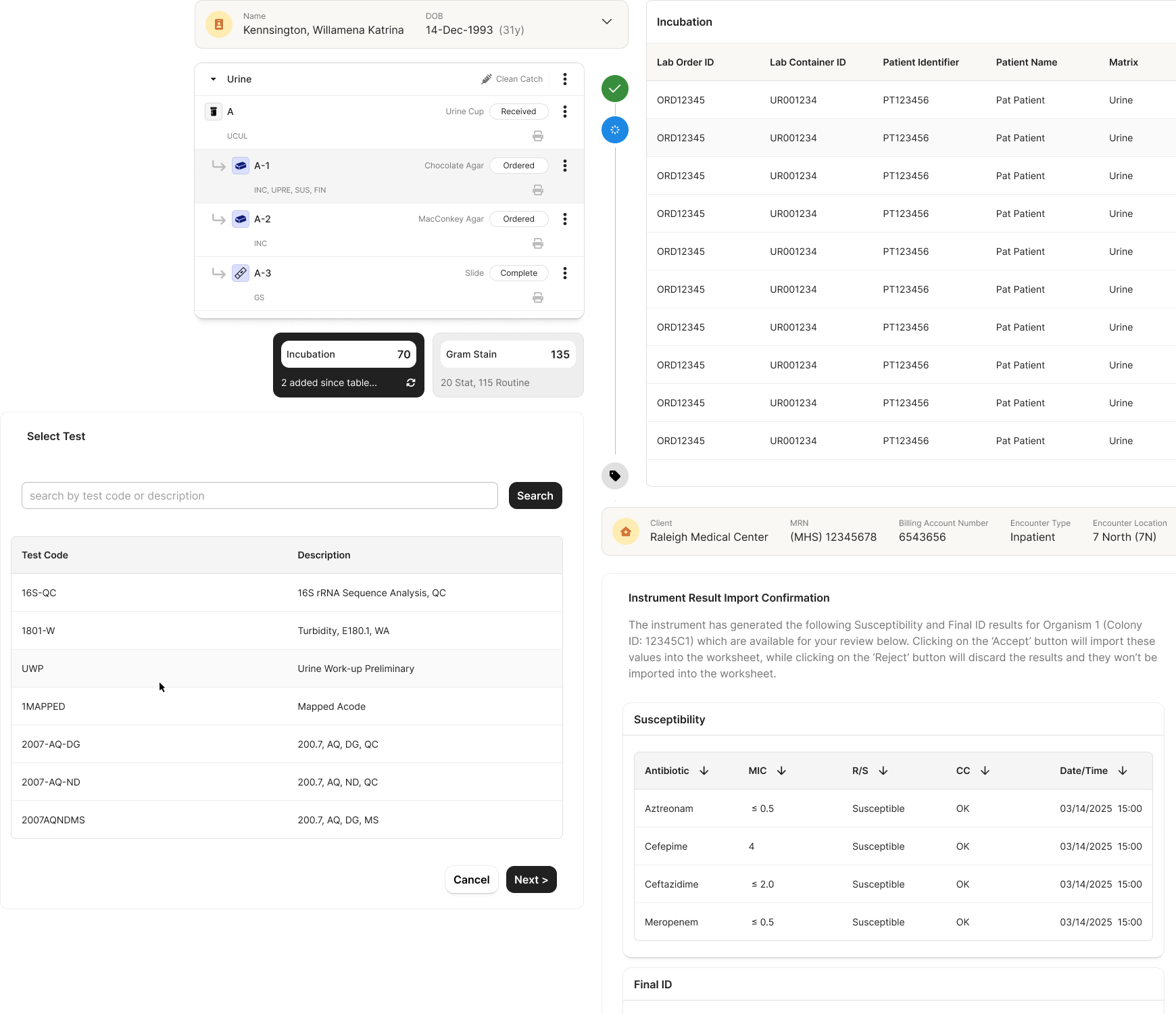
Contributions
- Attended client focus groups and workflow walkthroughs
- Synthesized research findings
- Developed workflow and information architecture models
- Defined a task-based workflow structure
- Designed and validated workflow concepts
- Conducted usability testing and analyzed findings
- Iterated designs based on user feedback
Method
Combined observational research, workflow analysis, service blueprinting, information architecture, and usability testing to understand how microbiologists perform setup, incubation, organism workup, and resulting within a task-based Laboratory Management System (LMS).
Clinisys was building a single laboratory platform intended to support both Clinical and Environmental laboratories. The existing CLS platform was originally designed for Environmental workflows and had been adapted for Clinical use through configuration and workarounds. While this approach supported some clinical disciplines, it was not well suited for Clinical Microbiology.
Microbiology introduced additional complexity. Unlike many laboratory disciplines that follow predictable testing paths, microbiology requires repeated incubation, observation, organism workup, and follow-up testing over time. Results generated during the process determine the next actions, creating cyclical workflows that can span multiple days.
The goal was to design a microbiology solution that could operate within the constraints of an existing Environmental laboratory platform while supporting the needs of both Clinical and Environmental laboratories.
Challenges
- Setup, task execution, and resulting were fragmented across multiple screens.
- Users manually tracked workflow progression across incubation timepoints.
- Follow-up work lacked visibility.
- Organism-level work was difficult to trace.
- Existing workflows did not adequately support microbiology's cyclical nature.
- Clinical workflows needed to fit within an existing task-based LMS architecture.
Constraints
- Existing CLS platform architecture
- Established task-based LMS framework
- Support for both Clinical and Environmental laboratories
- Complex microbiology workflows
- High-volume laboratory environments
- Traceability and audit requirements
Understanding how the workflow actually happens
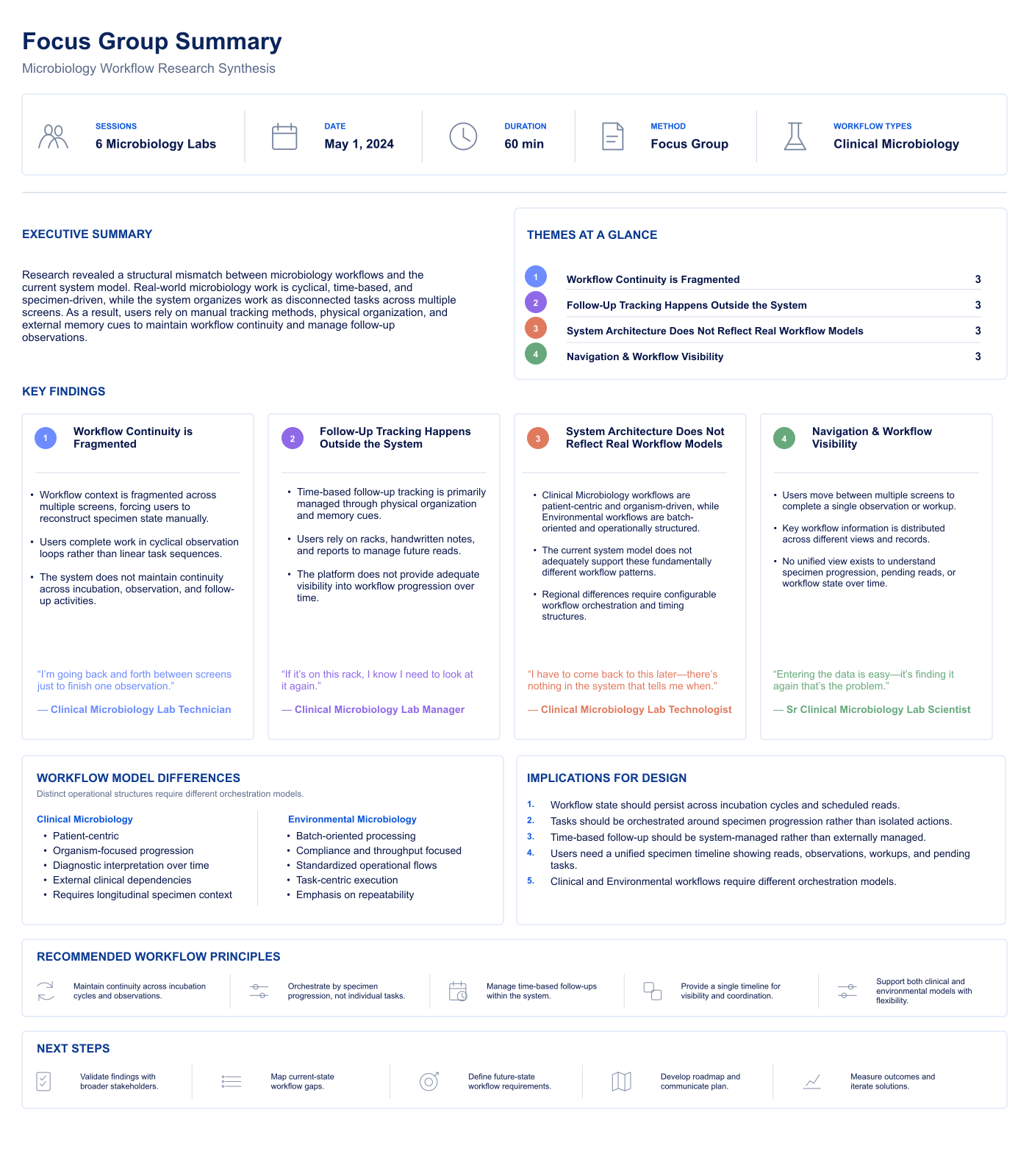
To understand existing laboratory workflows, I attended client focus groups and workflow walkthroughs led by the Product Manager. These sessions provided insight into how microbiologists performed setup, incubation, organism workup, and resulting, while highlighting pain points in the current workflow.
Workflow Findings
- Microbiology workflows are cyclical rather than linear.
- Work progresses through time-based tasks.
- Results determine subsequent actions.
- Follow-up work is continuously generated.
"I have to come back to this later — there's nothing in the system that tells me when."Clinical Microbiology Lab Technologist
Operational Findings
- Users relied heavily on manual tracking methods.
- Workflow visibility was fragmented.
- Duplicate observations occurred across slides.
- Users needed visibility into pending and completed work.
"I'm going back and forth between screens just to finish one observation."Clinical Microbiology Lab Technician
Structural Findings
- Organism-level work needed to remain connected to media and specimen context.
- Task execution needed to support repeated observations and follow-up actions.
- Clinical and Environmental workflows required different organizational models.
"Entering the data is easy — it's finding it again that's the problem."Sr. Clinical Microbiology Lab Scientist
Mapping the current-state workflow
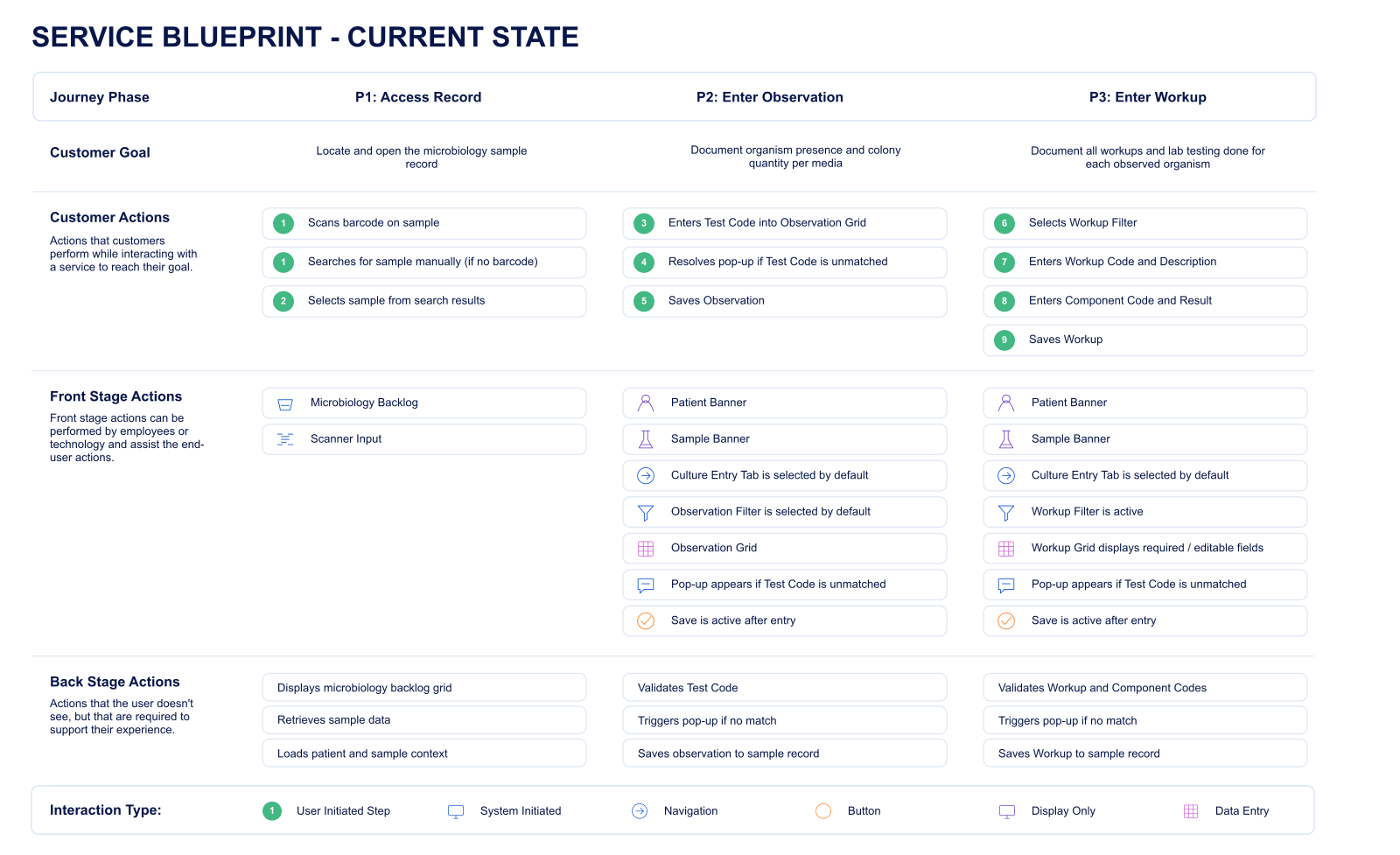
While synthesizing findings from the focus groups, I noticed a gap between assumed and actual behavior — what the workflow was supposed to look like didn't fully match what labs described doing. To investigate that gap directly, I personally interviewed three microbiology labs in 60-minute 1:1 sessions and mapped the current-state workflow in detail, exposing workflow dependencies, handoffs between laboratory roles, and opportunities to improve continuity.
- Workflow responsibilities shifted across multiple laboratory roles.
- Critical information was distributed across several workflow stages.
- Users frequently relied on memory and physical organization to maintain workflow continuity.
- Fragmented workflows increased cognitive load and reduced visibility into pending work.
- The blueprint identified opportunities to consolidate workflow information and improve continuity.
The internal SMEs guiding the platform's design had all worked in a microbiology lab at some point in their careers — but lab processes had changed significantly since then, leaving their assumptions about the workflow outdated. Meanwhile, many of the client labs had quietly built their own workarounds into the process, workarounds the platform's design had no visibility into.
A cyclical model, not a linear one
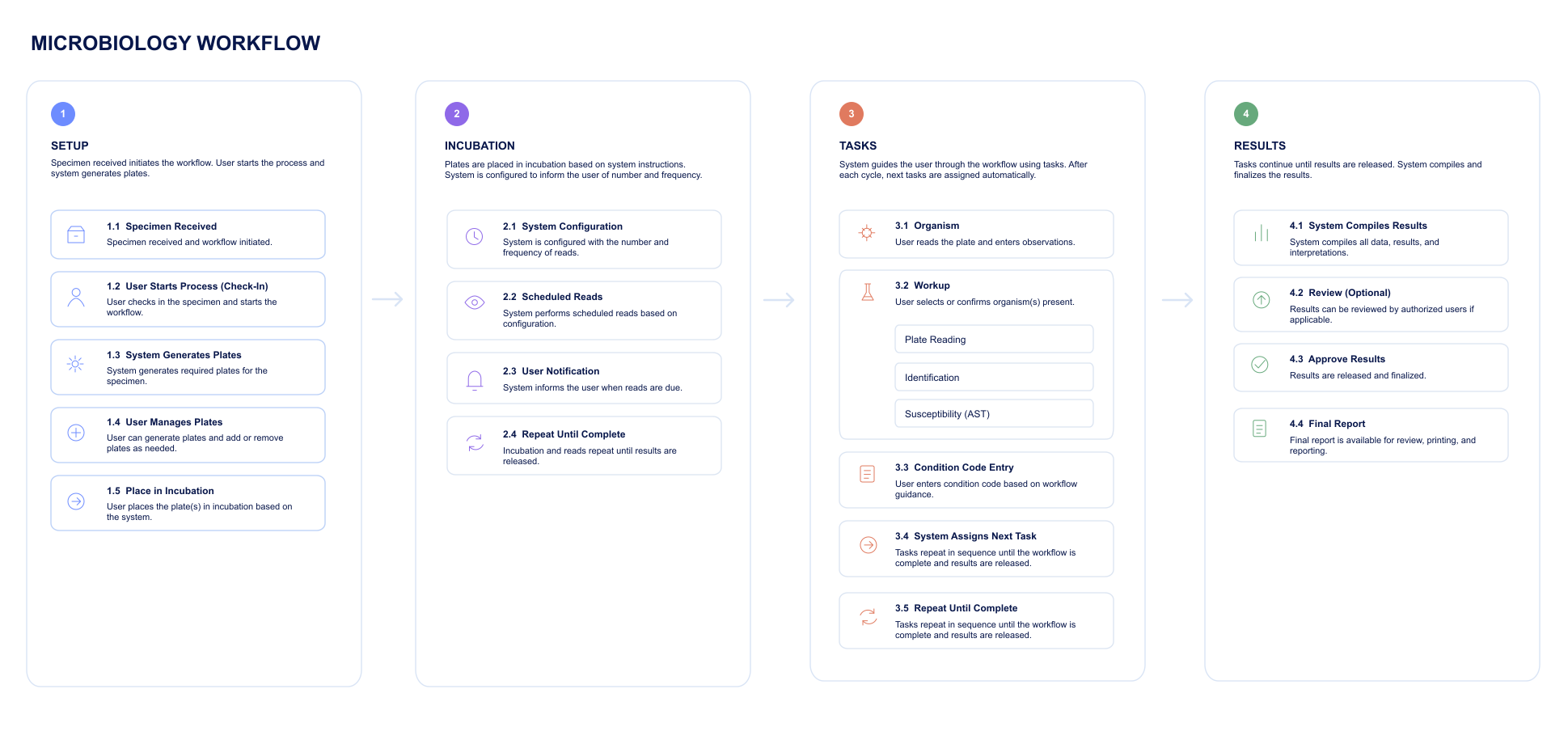
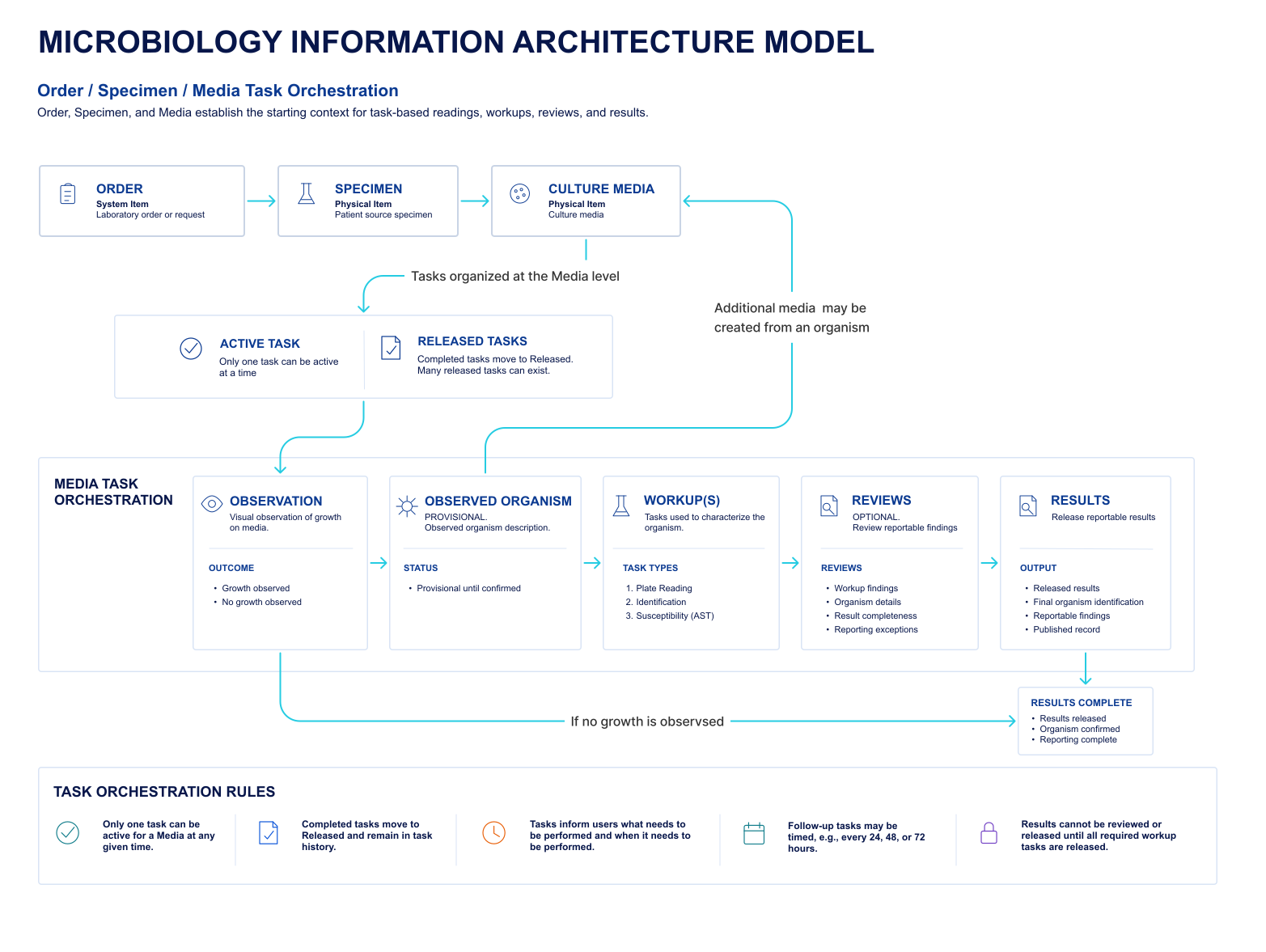
Research demonstrated that microbiology could not be represented as a simple linear workflow. I developed a workflow model illustrating how work progresses through setup, incubation, task execution, organism workup, and resulting while supporting microbiology's cyclical nature within a task-based LMS.
- Established a cyclical workflow model instead of a linear process.
- Defined how tasks are generated throughout the workflow.
- Clarified relationships between setup, incubation, workup, and resulting.
- Established condition codes as the mechanism for generating follow-up work.
- Improved workflow continuity across multiple incubation cycles.
Translating the model into a system structure
After defining the workflow, I developed an information architecture that translated the workflow model into a system structure. The IA established relationships between specimens, media, tasks, organisms, and workup activities while aligning with the existing LMS architecture.
- Tasks became the primary organizational structure within the LMS.
- Preserved relationships between specimens, media, organisms, and workup.
- Supported one-to-many relationships throughout the workflow.
- Improved traceability between workflow objects.
- Created a scalable structure capable of supporting future workflow expansion.
Each principle below traces back to a specific finding from research — what participants described, what the service blueprint exposed, or what the workflow model demanded — translated into a concrete decision in the redesigned experience.
Unified Workflow Experience
Participants were direct about where the real friction was: "Entering the data is easy — it's finding it again that's the problem." Losing specimen and organism context while moving between screens, not data entry itself, was the actual cost. The redesign addressed that directly by connecting key microbiology activities into a single, continuous experience. The unified workflow supports:
Users could move seamlessly between work items without losing specimen or organism context.
Task-Based Workflow
Focus groups made clear that microbiology doesn't progress in a straight line — results determine what happens next, and until then that next step exists only in someone's head. The interface aligned microbiology workflows with the LMS's task-based architecture so the system, not the user, tracks and generates what comes next. Tasks were:
This allowed microbiology workflows to operate within the existing LMS while supporting the dynamic nature of laboratory work.
Organism-Centered Workup
Research findings specifically flagged that organism-level work needed to stay tied to its media and specimen origin — without that link, tracing an organism back to its source became guesswork. The redesign established clear relationships between laboratory tasks and organism-level work: observations performed during task execution generated organisms, which then progressed through workup activities including:
Maintaining organism context throughout the workflow improved traceability and reduced unnecessary navigation.
Support for Cyclical Workflows
The service blueprint showed how much labs were already compensating for a process that assumed linear progression — building their own tracking methods for work that needed to loop back. Rather than forcing microbiology into a linear process, the design supports repeated workflow progression through:
Condition codes determine subsequent actions and automatically generate new tasks, allowing work to continue without breaking workflow continuity.
Improved Workflow Visibility
One lab manager put it plainly during a focus group: they only trusted a specimen's status once they'd physically laid eyes on it in a rack. Users had built physical tracking systems because the platform gave them no equivalent — and duplicate observations across slides were one direct cost of that gap. The redesigned interface increased visibility into laboratory work by providing a unified view of:
This reduced reliance on manual tracking methods and improved users' awareness of workflow progression.
Where the design held up, and where it didn't
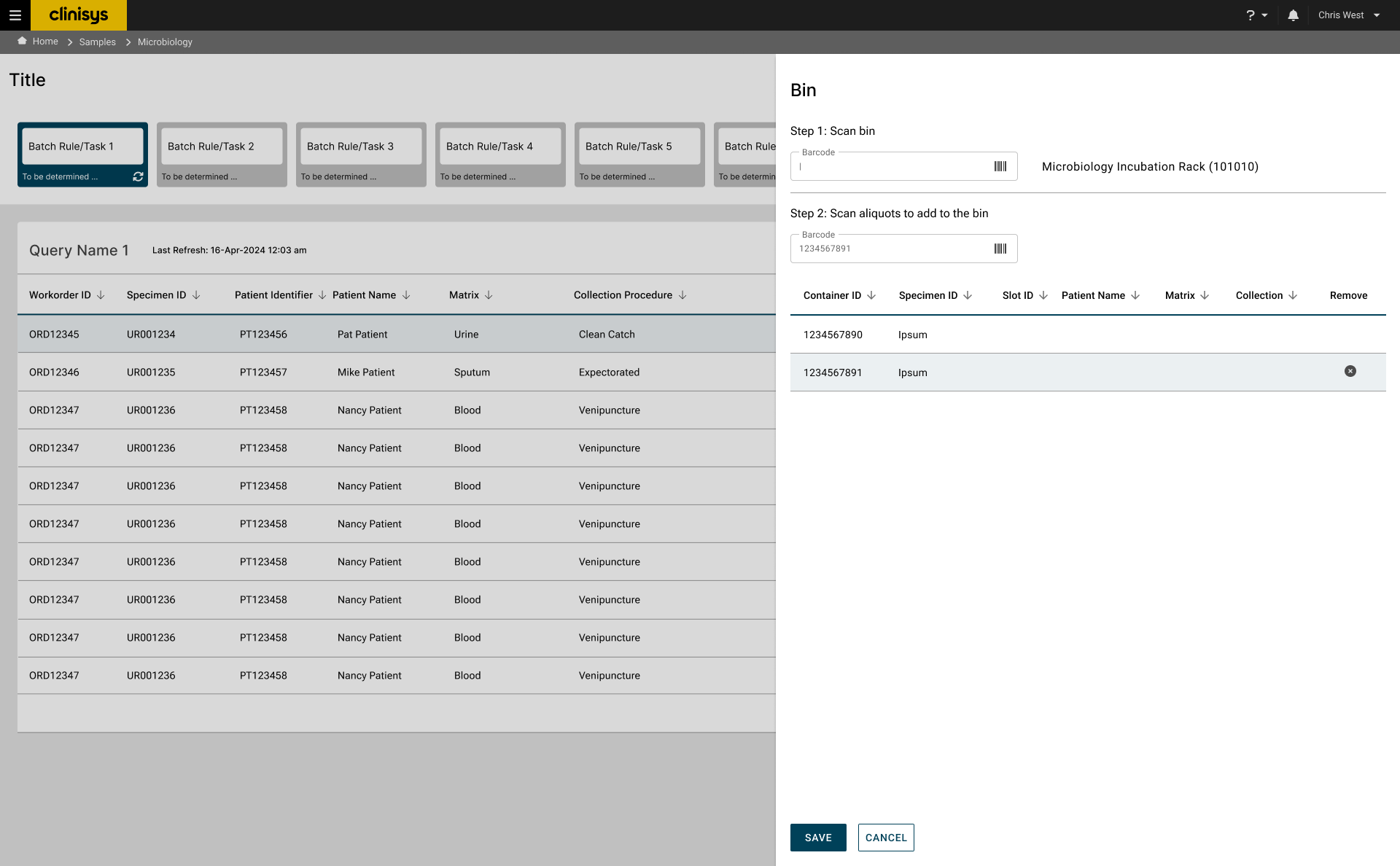
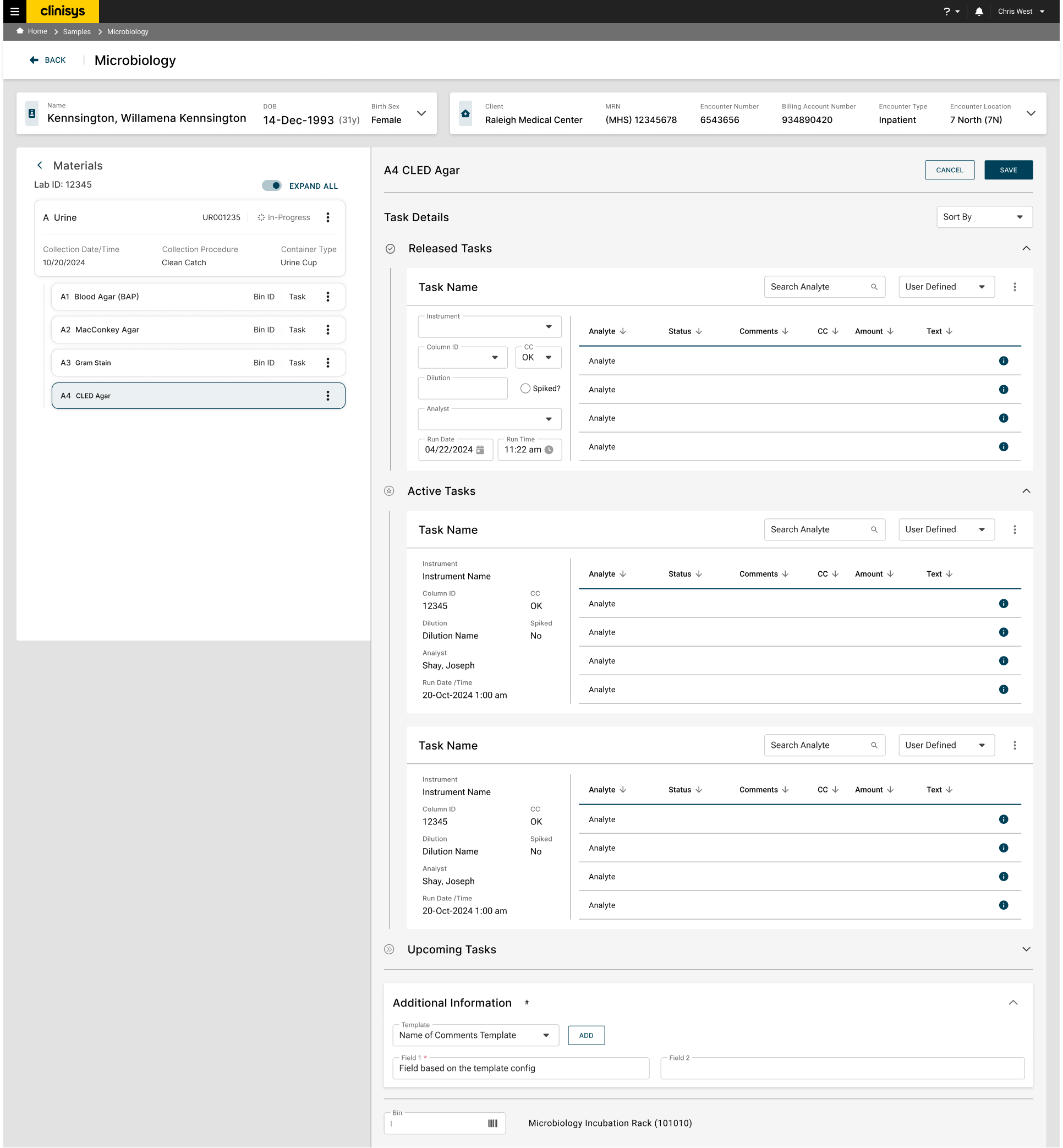
This round evaluated low-fidelity wireframes with five Clinical Microbiology professionals representing client laboratories, each in a 60-minute one-on-one remote session built around scenario-based workflow walkthroughs. Five sessions is a small sample, but it matches the intent of testing at the wireframe stage: validate direction and catch structural problems early, before investing in a working prototype, with a population — clinical microbiology staff with hands-on setup and resulting experience — that is inherently narrow and hard to recruit at scale. Sessions covered worklist navigation, barcode-driven work location, specimen setup and plate configuration, observations and sub-plate creation, material hierarchy navigation, and batch-resulting concepts. Participants engaged with the proposed workflows productively, but unfamiliar terminology and structural differences from their current systems surfaced early.
Because this round tested low-fidelity wireframes rather than a working prototype, sessions focused on validating workflow concepts, information architecture, and terminology rather than polished interface interactions. That shifted the format toward participants describing how they'd want the workflow to work, rather than completing scripted tasks start to finish. The findings below reflect that: directional, concept-level feedback that shaped the interactive prototype evaluated in the next round.
Terminology Confusion
Terms like "backlog," "aliquot," and "matrix" caused confusion. Users preferred familiar language aligned with microbiology workflows, such as "pending list," "order ID," and "plates."
Recommendation: replace ambiguous terms with microbiology-specific language, or allow customizable terminology.
Role-Specific Workflows
Receiving and setup tasks are distinct and handled by different roles with minimal overlap — different staff handle specific stages of the microbiology workflow, and the system needs to accommodate that division.
Recommendation: tailor workflows to align with the distinct tasks handled by receiving, setup, and result-entry roles.
Missing Workflows
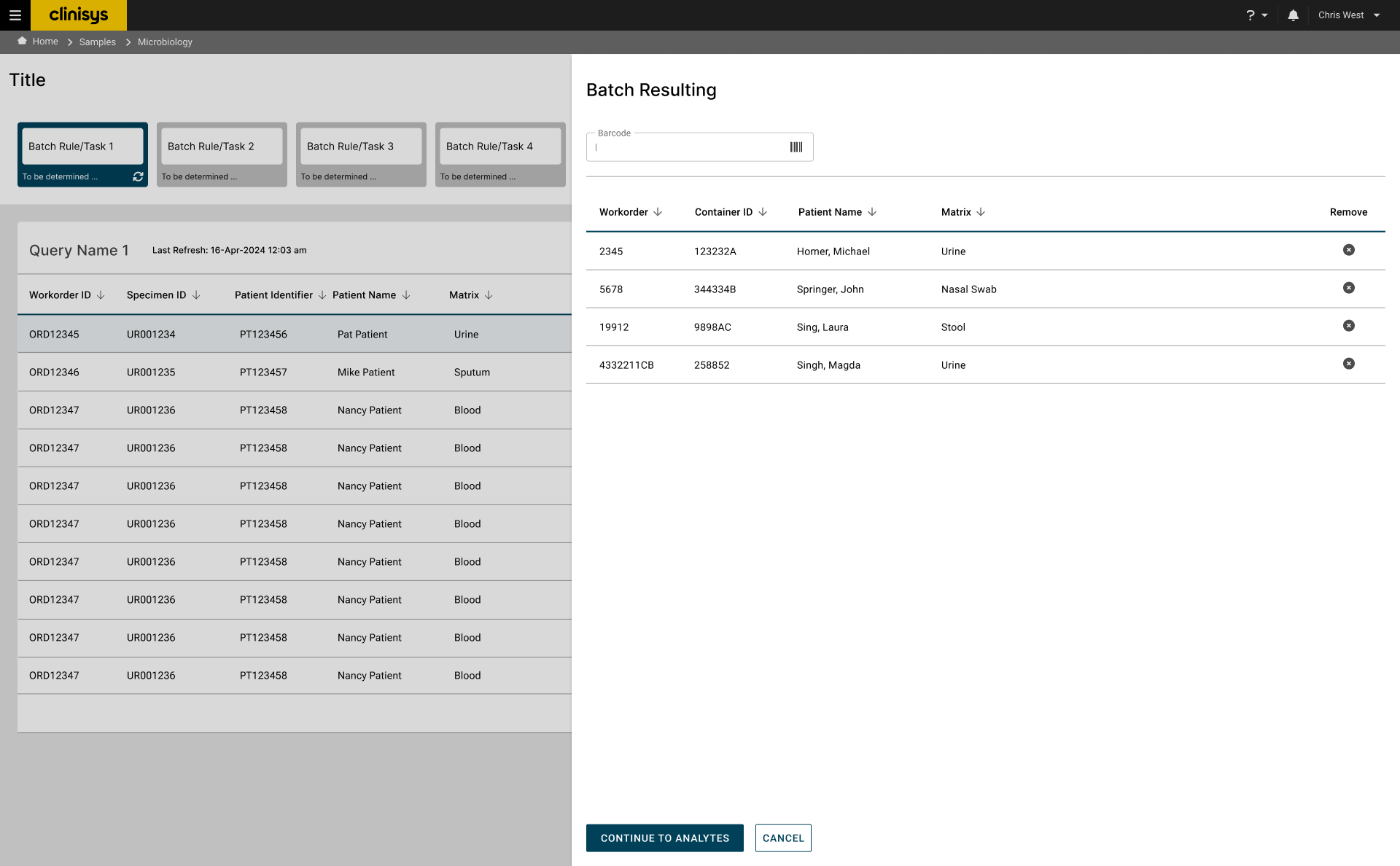
Users highlighted missing workflows — setup time tracking, no-growth reporting, and handling mixed flora results — all of which are crucial for efficiency.
Recommendation: add functionality for setup time tracking, no-growth reporting, and mixed flora result handling.
Plate Management
Users expressed mixed interest in adding or deleting plates and direct exams, generally preferring their current systems, where plates are preconfigured without extra work. Where this functionality exists, users emphasized the need for permissions to control it.
Recommendation: develop permissions to control adding or deleting plates and direct exams, keeping preconfigured workflows the default where possible.
Data Presentation
The material tree was radically different from what users were accustomed to and required adjustment. Users also wanted order comments, special requests, and modifiers visible on the main screen to tell specimens apart — such as wounds from different sites — and needed to see all pending microbiology work, not just work tied to the current encounter.
Recommendation: incorporate updates from the Clinisys Design System for data display and visual consistency, and surface comments, requests, modifiers, and a unified pending-work view directly on the main screen.
What the interactive prototype confirmed
This second round moved from wireframes to a working interactive prototype, tested with five Clinical Microbiology professionals in 60-minute one-on-one remote sessions built around scenario-based task completion — locating and prioritizing work from the backlog, completing specimen setup, reviewing and adjusting automatically configured plates, navigating between specimen pages, adding observations to plates, and completing resulting activities. The goal here was narrower than round one: check whether the underlying workflow held up once it was in front of users as something they could actually click through, and surface anything that didn't.
Between rounds, the prototype received the design system and light visual refinement — but the underlying workflow structure carried over from the wireframes largely as-is. Participants had expected their round-one feedback to translate into deeper structural changes, and the gap between that expectation and what they actually got is what surfaced as a cost-of-interaction concern in this round: the workflow looked more finished, but still took as many clicks and steps as before.
The system-level view
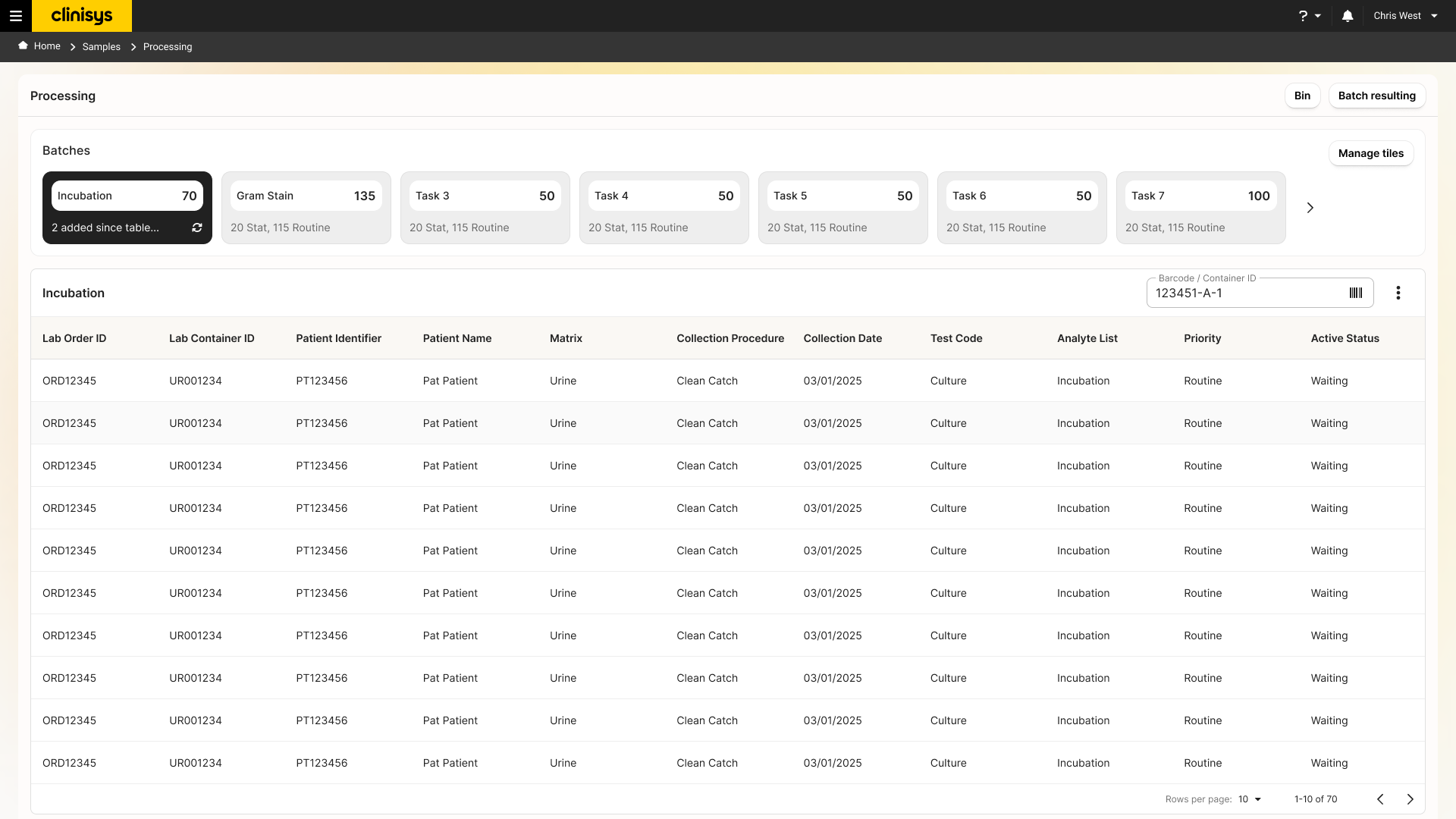
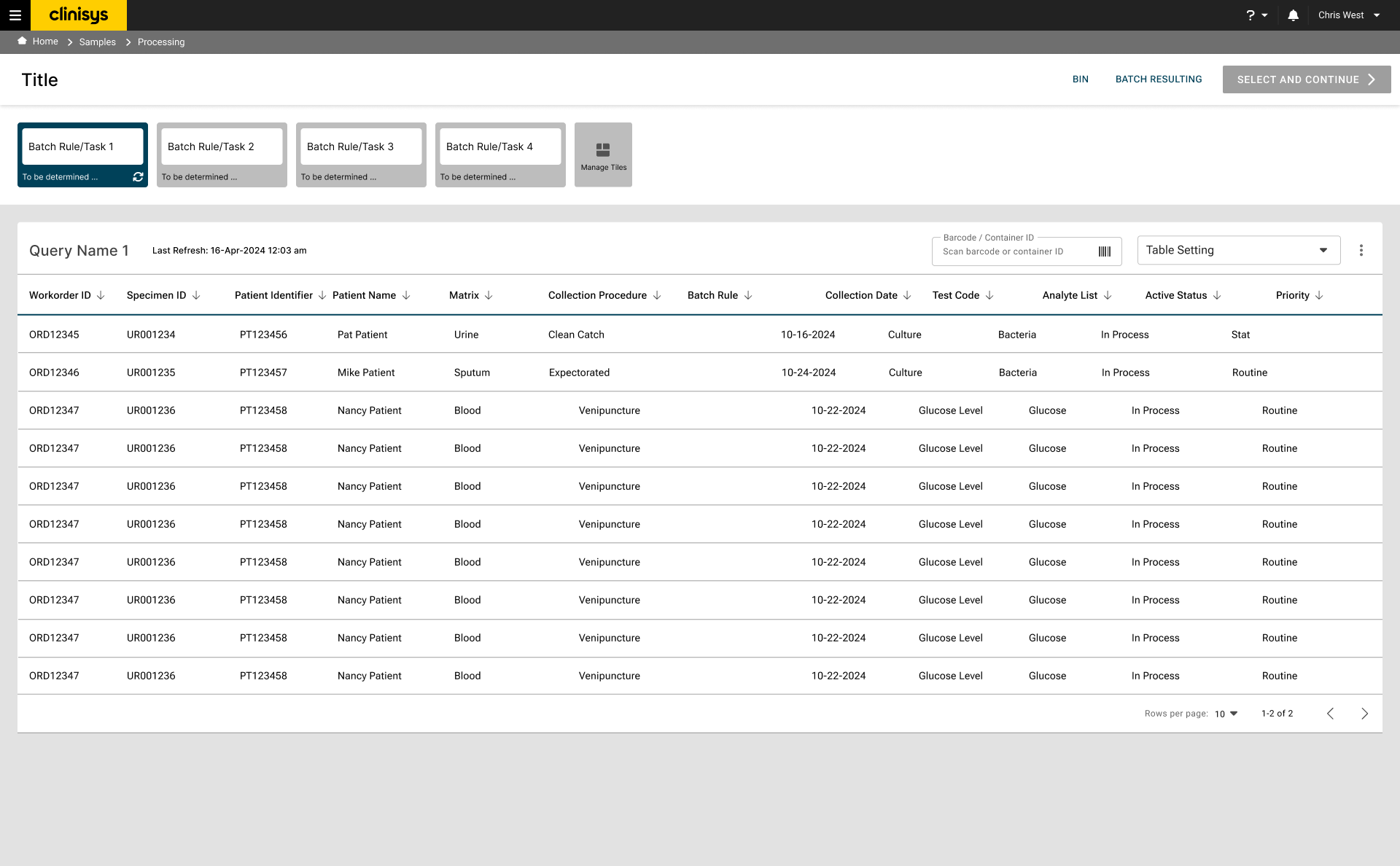
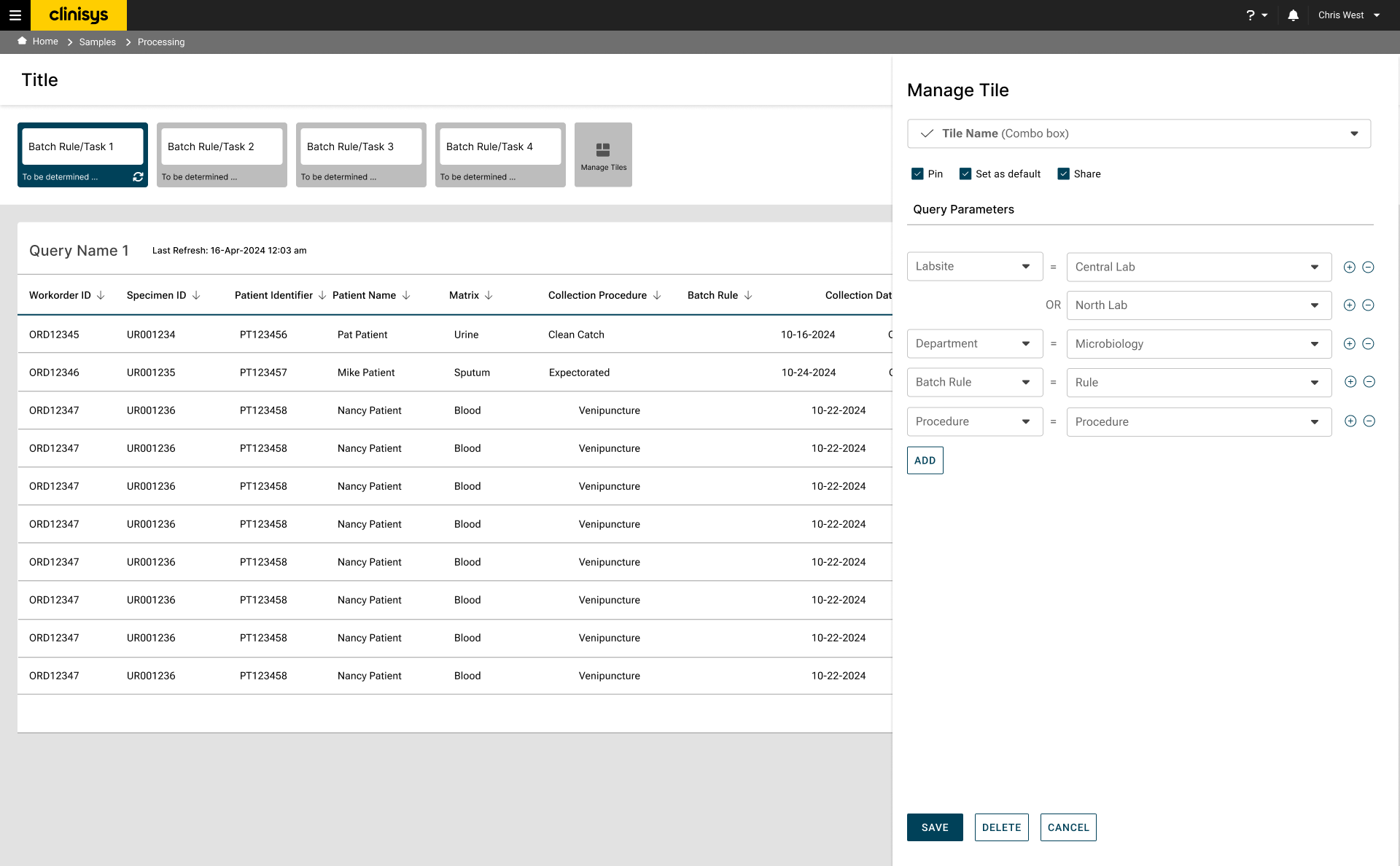
Batches group work by task type and surface counts and priority mix at a glance — the interface behind Task-Based Workflow and Increased Contextual Information. Click to enlarge.
The drill-in view
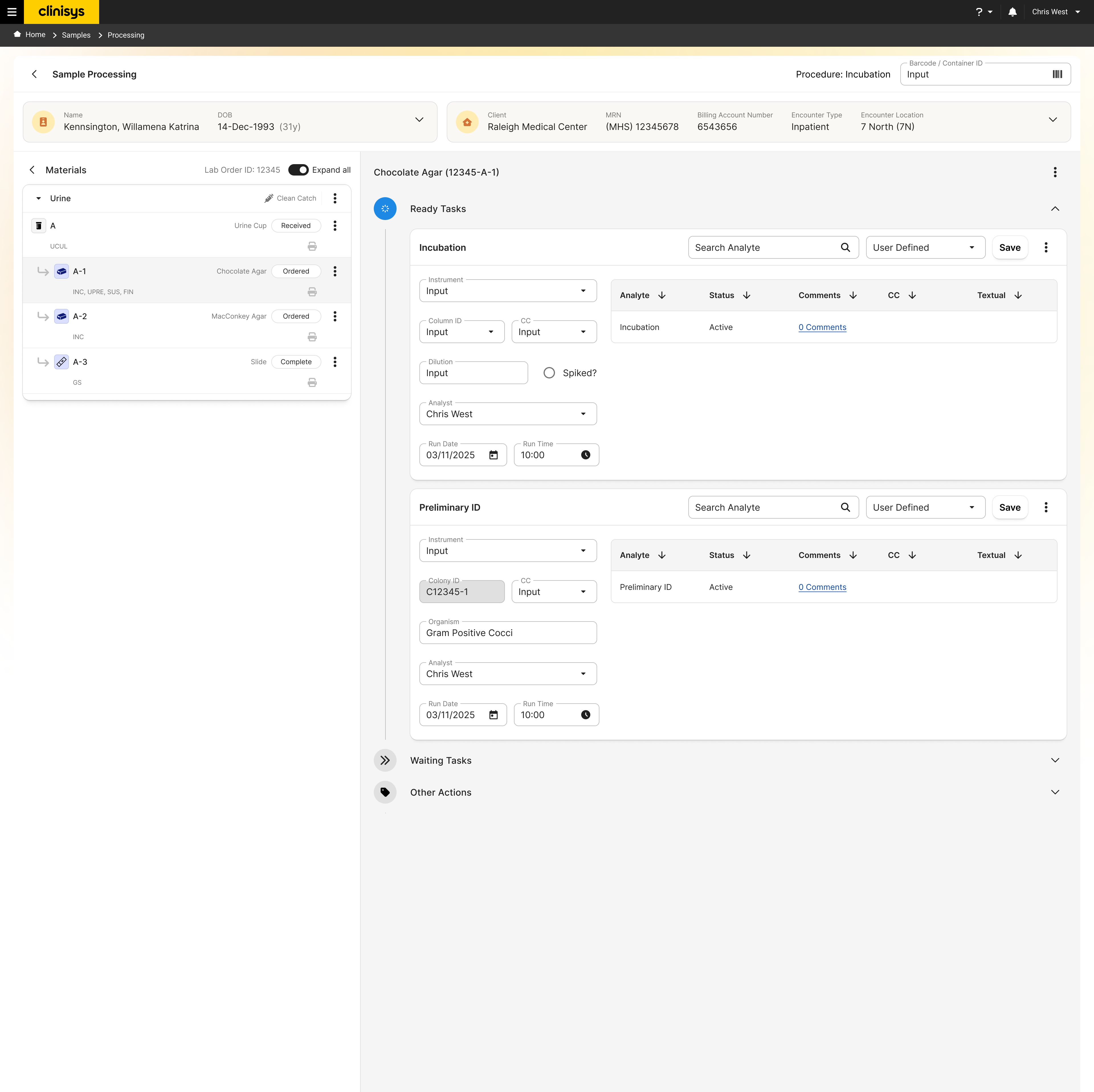
Opening a batch item keeps specimen, media, and organism context together while tasks like Incubation and Preliminary ID run in place — the interface behind Material-Based Navigation and Personalized Worklists. Click to enlarge.
Task-Based Workflow
Confirmed that the task-based model supported representative Clinical Microbiology activities end to end, from backlog through resulting.
Held up structurally — validated as sound going into development.
Personalized Worklists
Participants consistently valued being able to organize and prioritize their own work directly from the backlog, rather than working strictly in system-assigned order.
Confirmed as a strength of the existing model, not a new addition.
Increased Contextual Information
Visibility into specimen comments and details reduced how often participants had to navigate elsewhere to find information they needed mid-task.
Confirmed as working well, carried over from the wireframe stage.
Material-Based Navigation
Unfamiliar at first, but participants reported the organization became intuitive after working through representative scenarios.
Recommendation: build onboarding materials to shorten the initial learning curve for new users.
Workflow Efficiency & Cost of Interaction
Because participants expected the interaction cost of the wireframes to come down once the design matured, and it largely didn't, remaining feedback centered on adoption and efficiency rather than fundamental usability — the workflow was sound, but still required more clicks and steps than participants expected at this stage.
Recommendation: conduct a Consumption Report (Cost of Interaction analysis) to compare workflow efficiency objectively before development.
Testing the interaction-cost concern objectively
The client came out of prototype validation with concerns that the redesigned workflow required more work than the system it was replacing. Rather than settle the question qualitatively, this analysis mapped a representative workflow step by step in both the current application and the proposed design, scoring each step against five interaction metrics. It's a structured walkthrough rather than moderated testing with live participants — the goal was to isolate exactly where, and by how much, interaction cost changed, and to weigh that against what the added interactions bought in return.
The current-state and proposed-workflow maps aren't matched turn for turn — the proposed workflow restructures the task itself (launching and importing a worksheet, for instance, has no equivalent step in the current system). Totals are compared at the workflow level, not the step level, which is why the findings below focus on where cost was added and what kind of cost it was, rather than a simple step count.
Today's workflow, mapped
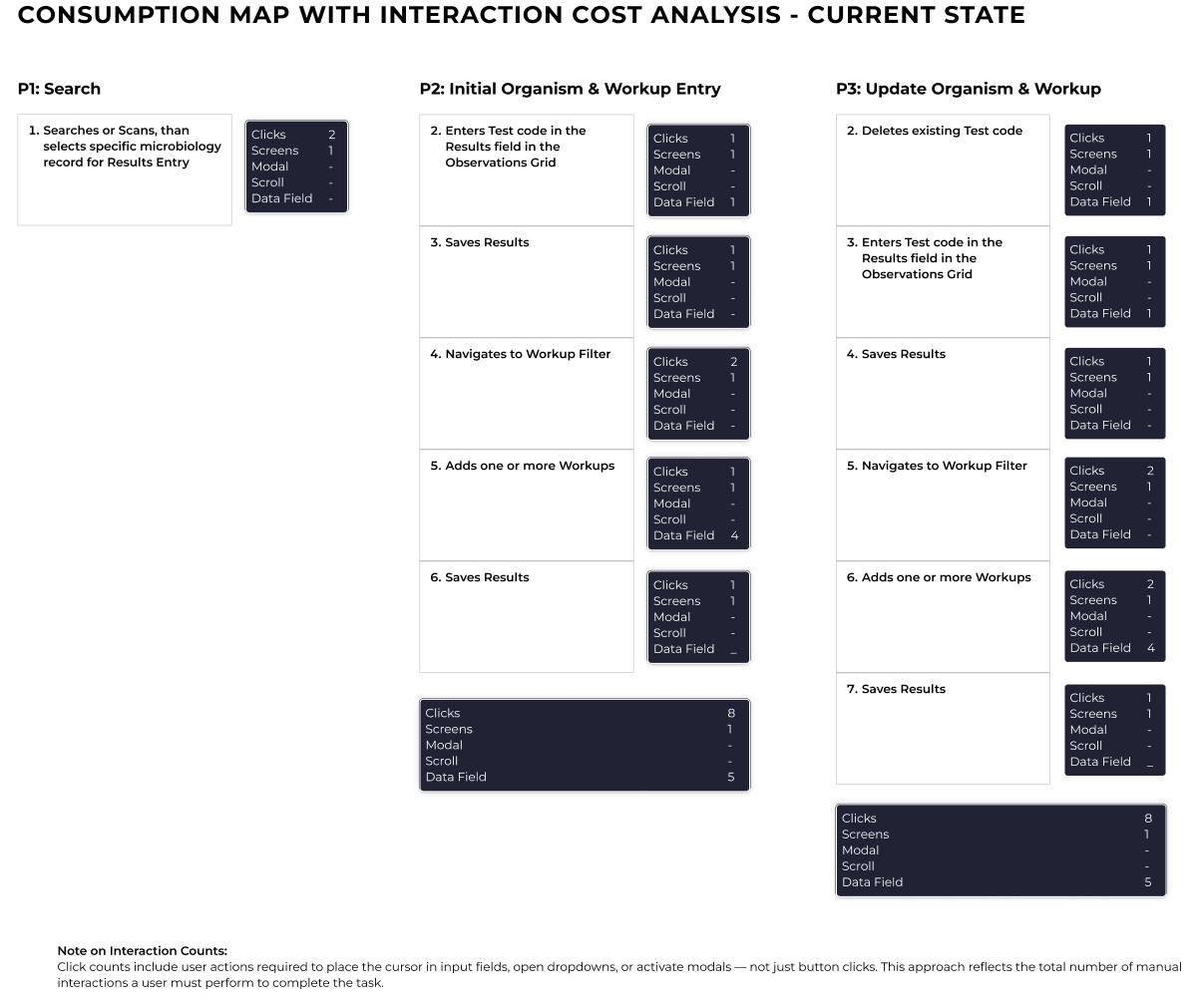
Totals: 18 clicks · 3 screens · 0 modals · 0 scrolls · 10 data fields across the representative workflow. Click to enlarge.
The redesign, mapped the same way
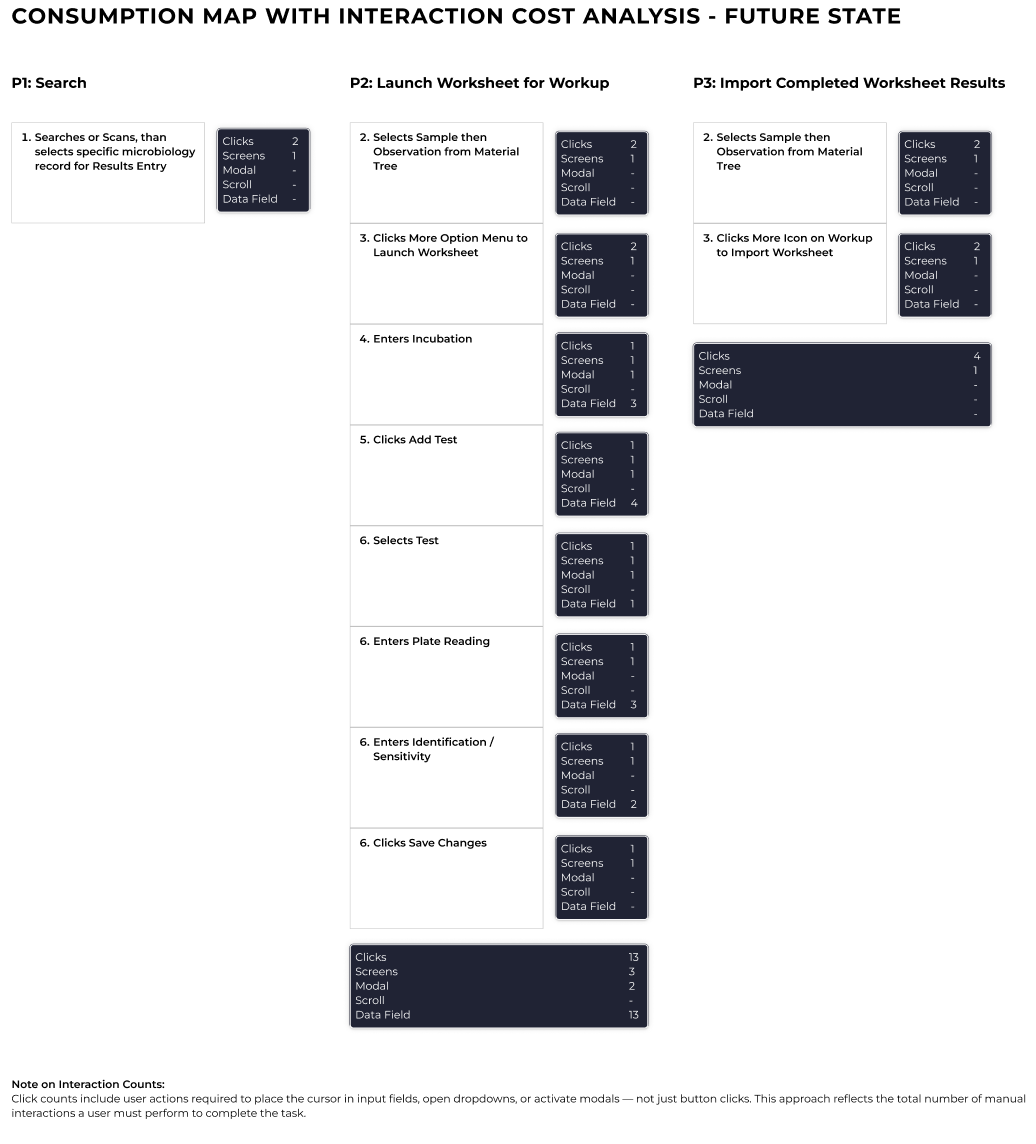
Totals: 19 clicks · 5 screens · 2 modals · 0 scrolls · 13 data fields across the representative workflow. Click to enlarge.
Where the added cost actually sits
Interaction cost did go up — but not evenly across the five metrics. Clicks rose only modestly, from 18 to 19, while the real increase shows up elsewhere: the proposed workflow adds two full screens, introduces modal dialogs where the current system has none, and asks for three more data fields, largely because it now captures a Launch Worksheet step with no equivalent in the current application.
Cost Is Structural, Not Click Volume
Clicks increased only marginally (18 → 19 across the analyzed steps). The added cost is concentrated in more screens (+2), new modal dialogs (0 → 2), and more data entry (+3) — a change in workflow shape, not a broad increase in clicking.
Recommendation: frame the tradeoff around structure, not interaction count alone — it more accurately reflects where the added effort sits.
The Two New Modals Are the Concentrated Cost
Modals went from zero to two — the only metric that changed from none to some, rather than shifting incrementally. Both occur in the Launch Worksheet path, and modals carry a higher interruption cost than an inline interaction with the same click count, since they block the screen and require an explicit dismissal.
Recommendation: evaluate whether either modal can be inlined or replaced with a non-modal control — the most concrete opportunity to cut cost without losing workflow value.
The Added Interactions Bought Real Visibility
Users gained immediate access to comments, task ownership, workflow state, and relationships between laboratory materials that previously required extra navigation or weren't visible at all.
Recommendation: keep emphasizing contextual information while making sure it stays easy to scan, not just present.
Constraint-Driven, Not Preference-Driven
Several of the structural decisions weren't usability choices in isolation — they came from building inside a shared, task-based Laboratory Management System that also has to support Environmental lab workflows, rather than a patient-centric system built for Clinical Microbiology alone.
The additional interactions largely trade click-minimalism for transparency, traceability, and a workflow model that scales across both lab types — a deliberate tradeoff, not an oversight.
The redesign was built and shipped. Because it departed so radically from the existing structure, clients needed real time to adjust — the new model also required more clicks to move through a workflow than the old one did. That was a known, deliberate trade-off: the company chose depth of visibility over speed of interaction, betting that surfacing the full picture of specimen, organism, and task state would matter more than minimizing clicks.
That bet paid off. In monthly client demos, reception shifted over time from cautious to genuinely enthusiastic — clients began asking when the redesigned workflow would be ready for their own labs. The visibility the trade-off bought wasn't incidental: in clinical microbiology, a clearer view of specimen and organism status at every stage translates directly into faster, safer resulting.
This project moved microbiology from a set of fragmented, screen-by-screen tasks to a single cyclical workflow model that reflects how the work actually happens — setup, incubation, organism workup, and resulting, connected by condition codes that generate the next task automatically. Grounding that model in direct observation, rather than the platform team's own outdated assumptions about lab process, was what made it possible to design a structure both Clinical and Environmental labs could work within.
The bigger takeaway is methodological. When qualitative feedback and objective measurement disagreed — participants said the workflow felt harder to use, even though the model itself tested as sound — the answer wasn't to pick a side, it was to build the tool that could settle the question. That instinct, reaching for a Consumption Map instead of arguing the point, is what kept the project honest about its own trade-offs at every stage, from the first focus group to the final ship.